14-bit RAW Thermal Camera Module: FlexMini 640 vs InfiRay Mini2 640
CAMCUDA / ENGINEERING CASE NOTES
A resolved FlexMini 640 integration issue—and the checks that make a RAW image workflow clear.
Verify the path.
640×512 LWIR · USB UVC Y16
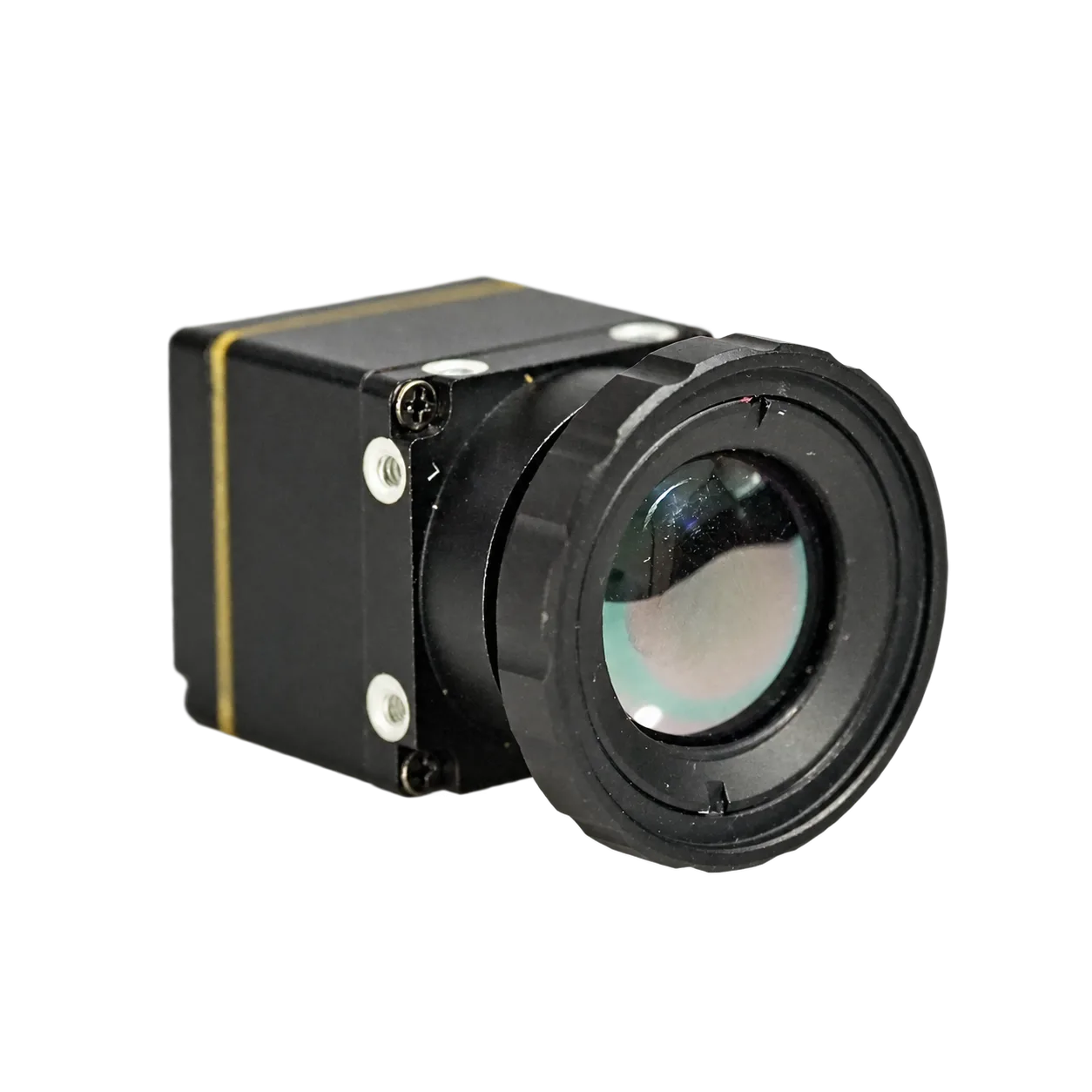
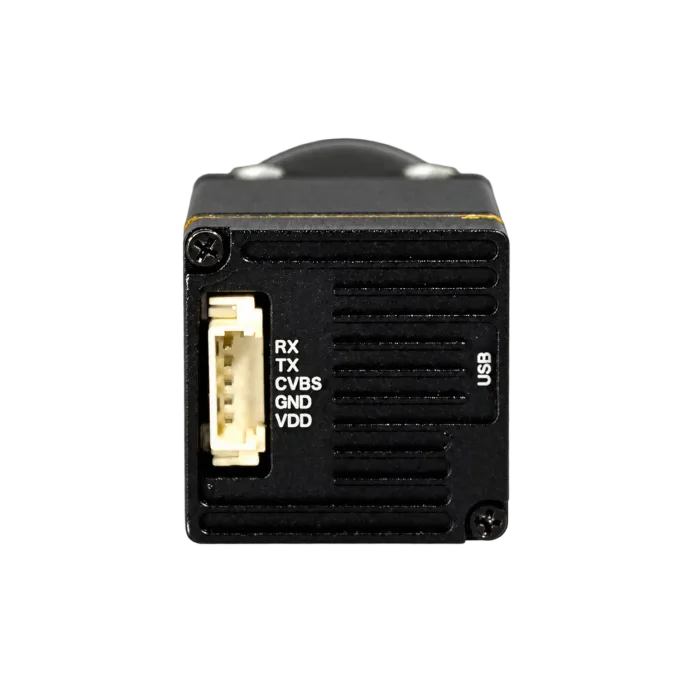
FlexMini 640 product reference, 4.9 mm assembly. Not the customer’s unit.
Choosing a RAW thermal camera module starts with the acquisition format, not just the image on screen. OEM integration also needs a defined format, an understood image source and a buffer the host can use without confusing display processing with original data.
The CAMCUDA FlexMini 640 Raw Data Output Thermal Camera Module14-bit RAW · Y16 offers a USB UVC Y16 path for matched configurations. The module provides 14-bit RAW grayscale data in a 16-bit Y16 container. Here is a brief customer case, followed by a guide to checking that path.
The integration case: a firmware upgrade resolved the issue
A German customer’s FlexMini 640 RAW/Y16 integration issue was resolved after a firmware upgrade. The outcome illustrates why firmware compatibility belongs alongside hardware and host requirements when planning an evaluation.
The engineering workflow below uses the current FlexMini 640 guides and integration resources. It is not a reconstruction of the customer’s test session, nor a promise that the same upgrade resolves every acquisition problem.
14-bit data. 16-bit storage.
FlexMini 640 provides 14-bit original grayscale data in a 16-bit Y16 container. The original quantization has 16,384 theoretical code levels; the storage uses two bytes per pixel. A native 16-bit signal would have 65,536 theoretical code levels, but the same storage size.
| Compare | FlexMini 640 14-bit data in Y16 | Native 16-bit data Format comparison only |
|---|---|---|
| Original quantization | 14 bits | 16 bits |
| Theoretical code levels | 16,384 | 65,536 |
| Storage per pixel | 2 bytes | 2 bytes |
| Can use Y16 storage | Yes | Yes |
Y16 enumeration and a uint16 buffer do not prove 16-bit original precision. Left-shifting 14-bit values by two or multiplying them by four does not add original image detail. Actual imaging performance depends on detector noise, sensitivity and correction; it is not a fourfold gain in image quality or temperature accuracy. See the Linux V4L2 luma-format specification. FlexMini 640 output is non-radiometric grayscale, not calibrated temperature data.
Use the decoding and transport details for the selected RAW mode. A format name alone does not define that mode’s packing or alignment. Do not apply another camera’s temperature-conversion formula to FlexMini 640 RAW image values.
FlexMini 640 VS INFIRAY MINI2 640
RAW data comparison: FlexMini 640 vs InfiRay Mini2 640
Both modules use an uncooled VOx 640×512 detector, 12 μm pixels and an 8–14 μm LWIR waveband. Compare the basic imaging specifications first, then the RAW data access and host-side processing options.
| Specification / output | CAMCUDA FlexMini 640 14-bit RAW · Y16 | InfiRay Mini2 640 |
|---|---|---|
| Detector / resolution | Uncooled VOx / 640×512 | Uncooled VOx / 640×512 |
| Pixel pitch | 12 μm | 12 μm |
| LWIR waveband | 8–14 μm | 8–14 μm |
| Nominal frame rate | 50 Hz hardware specification; the Y16 capture mode depends on firmware and host support. | 30 / 60 Hz detector frame rates. |
| Published NETD | ≤30 mK | ≤40 mK at 25°C, F/1.0, 25 Hz |
| RAW grayscale output | Yes — 14-bit RAW grayscale via USB UVC Y16. The container is 16-bit; the documented grayscale data is 14-bit. | No — processed video only. No original RAW grayscale frame output. |
| Data available to the host | Original 14-bit grayscale data in a 16-bit Y16 container. The documented Y16 capture example stores little-endian uint16; keep it separate from the optional 8-bit visual preview. | Display-processed video frames, rather than the original RAW grayscale buffer. |
| RAW source selection | RAW (0), pre-AGC (3) and post-AGC (4), subject to firmware capabilities. After a required Y16 restart, verify the active source. | No original RAW grayscale source exposed in the processed-video output. |
| Host-side image processing | Retain the original grayscale samples for your own normalization and image-analysis pipeline. | Work with the supplied processed video; original RAW samples are not available. |
A thermal video stream and a RAW image buffer serve different integration needs. CAMCUDA FlexMini 640 supports 14-bit RAW grayscale data in a 16-bit Y16 container. InfiRay Mini2 640 outputs processed video only, with no original RAW grayscale output.
Choose FlexMini 640 when your project needs RAW data, not just a thermal picture. Access to the original grayscale buffer lets your host application control display normalization and image analysis instead of relying solely on processed video.
The FlexMini 640 RAW path is non-radiometric. Y16 describes the storage format; the documented payload is 14-bit grayscale, not 16 bits of original grayscale information. Bit depth alone does not establish calibrated temperature measurement. Nominal frame rates are not guaranteed host capture rates, and the listed NETD values are not a matched-condition benchmark. Mini2 basic specifications: Mini2 series datasheet, page 2.
Select a supported source, then verify the active source
Start with what the installed firmware actually exposes. Page 4 of the public guide introduces these source selectors; the current FlexMini 640 resources clarify their capability checks. The capability mask determines which can be used on the matched module.
| Selector | Data path |
|---|---|
| 0 · RAW | Early ISP-stage detector output; Y14 grayscale in a 16-bit container |
| 3 · Pre-AGC | Before AGC / dynamic-range compression |
| 4 · Post-AGC | After AGC, described as retaining the 14-bit domain |
Separate NUC (1) and SFFC (2) selectors are removed. Their entries in the guide’s explanatory table should not be treated as selectable options.
- Read
caps_maskand current source status. - Request an available source and inspect
selected_sourceandpending. - If the change is pending, restart the Y16 stream.
- Read
active_sourceto verify the effective selection.
Requested is not the same as active. Treat the read-back as the completion check, not merely the successful SET response. Source selection is runtime-only and does not write Flash; do not assume a default source or retention after power cycling.
From a matched upgrade to Linux frame capture
1. Confirm the upgrade package
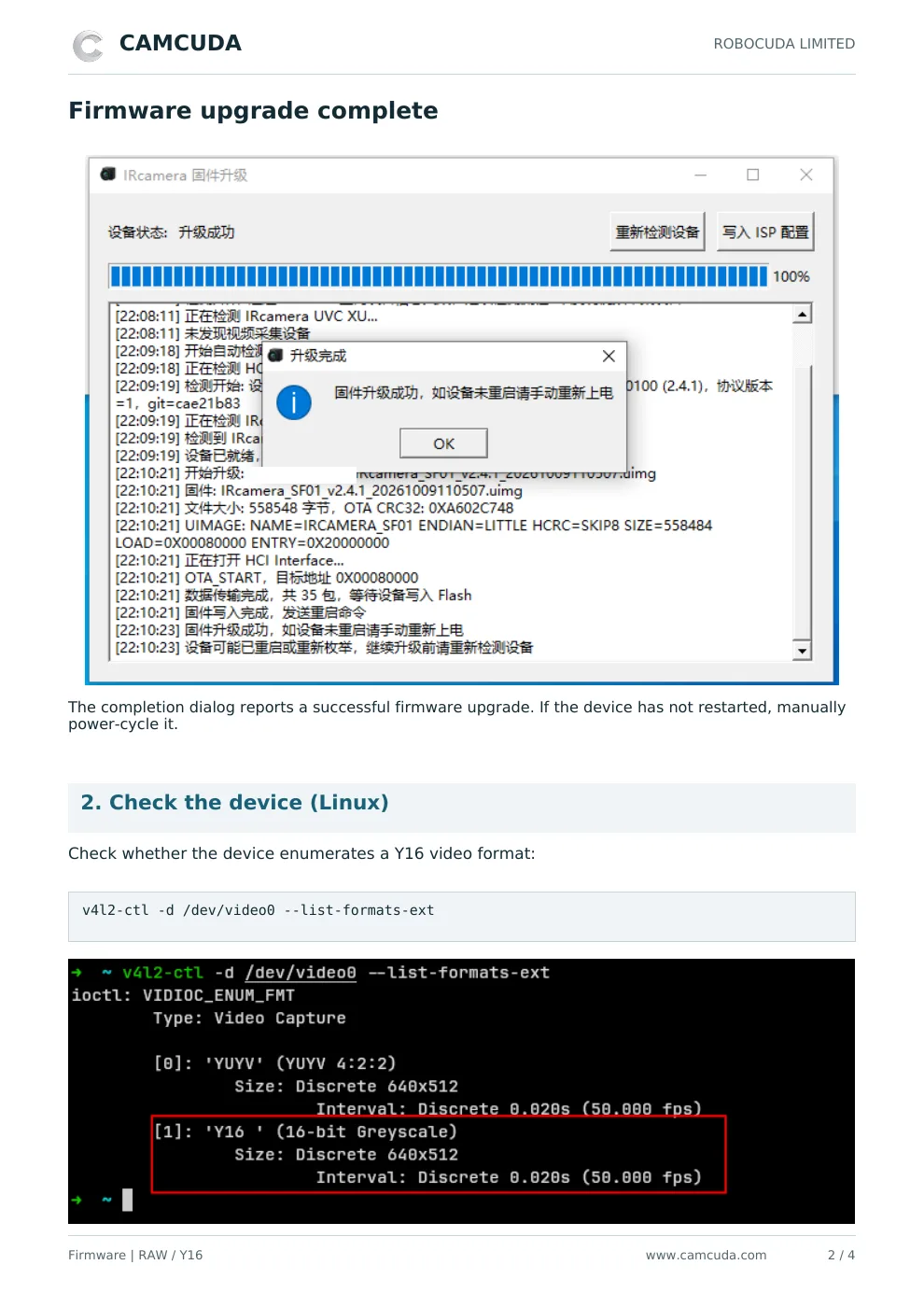
Before upgrading, agree the module and board revision, interface, host and compatible firmware with CAMCUDA. The public guide shows a Windows upgrade utility and calls for a power cycle if the device has not restarted after completion. A newer filename alone is not a compatibility check.
2. Enumerate the actual video device
The guide uses the following command to list available formats. /dev/video0 is an example path; identify the correct device on your host.
v4l2-ctl -d /dev/video0 --list-formats-extLook for Y16 and inspect its advertised sizes and intervals. The guide illustrates 640×512 at 50 fps; sustained receive performance still needs confirmation on the delivered module and host. The Linux API separates format enumeration from format negotiation. Check the driver’s returned format rather than assuming it accepted the request unchanged.
Use three distinct checks: advertised format, active image source and received frames. Seeing Y16 in the list answers the first question. Reading source status answers the second. Capturing on the intended host answers the third. Keeping those checks separate makes a support request more useful than reporting only that an image looks wrong.
3. Use the matching capture example
The Linux example builds with make. The guide then shows this capture invocation:
./raw_y16_grab /dev/video0 frame_y16.raw 640 512 5 frame_y16.pgm 10This is the guide’s example invocation. Use the matching README for argument definitions and adapt the device path to your host; do not infer each number’s purpose from its position. Confirm the active source and preserve the original buffer before feeding the frames into an algorithm.
Preserve the RAW buffer and troubleshoot the right layer
The supplied capture example stores consecutive little-endian uint16 frames without per-frame headers. For its 640×512 two-byte storage layout, one frame contains 655,360 bytes. That file size is not a transport-throughput measurement or a universal driver-stride rule.
The optional PGM is an 8-bit, percentile-stretched preview: useful for seeing the scene, but different from the original analysis buffer. Keep the RAW file alongside the source status and negotiated format. Otherwise, a display transformation can be mistaken for a change in the acquired data.
For comparison work, retain an untouched acquisition file and record which output each processing stage consumes. A display preview and a RAW frame should not be compared as though they were the same representation. This simple separation helps both the integration team and CAMCUDA discuss the data path without guessing what a screenshot contains.
| Observation | Next check |
|---|---|
| Y16 is not listed | Confirm device path, board, installed firmware and matching upgrade support. |
| Source request succeeds, image appears unchanged | Inspect pending state, restart Y16 when required, then read active_source. |
| Preview values differ from the RAW file | Check whether the compared output has been converted to the 8-bit preview. |
| Capture does not meet the intended rate | Check negotiated mode, host bandwidth and received frames; nominal settings are not measured delivery. |
| Pixel decoding is uncertain | Request source-specific alignment and scaling rather than guessing a mask or shift. |
Agree acceptance checks around the delivered configuration: source-switch behavior, shutter behavior and received-frame performance on the intended host. Keep a short record of the module and board revision, firmware, selected and active source, mode and output files. These are practical evaluation checks, not a substitute for measuring the configuration you plan to deploy.
CAMCUDA FlexMini 640 at a glance
Use this summary to frame the evaluation, then check the current product page for configuration, optics and ordering options. Hardware specifications and the firmware-dependent acquisition path are listed separately.
| Product | CAMCUDA FlexMini 640 Raw Data Output Thermal Camera Module 14-bit RAW · Y16 |
|---|---|
| Product configuration | FlexMini 640 14-bit RAW · Y16 |
| Detector / resolution | Uncooled VOx / 640×512 |
| Pixel pitch / waveband | 12 μm / 8–14 μm |
| Acquisition path | 14-bit RAW grayscale data in a 16-bit Y16 container. The documented capture reference uses USB UVC Y16; this is not native 16-bit sampling precision. |
| Image purpose | Non-radiometric grayscale acquisition |
| Lens options | 4.1, 4.9, 9.1, 13, 19 and 35 mm; availability and configuration by quotation |
Guides, SDK resources and compatibility
The four-page English and German guides bring the upgrade procedure, Linux format check, capture example and source-selector reference into one place.
- English firmware upgrade and RAW/Y16 guide · PDF
- Deutsche Anleitung: Firmware-Upgrade und RAW/Y16 · PDF
- FlexMini 640 SDK and integration resources · Google Drive
SDK compatibility: the reviewed control SDK v1.11.0 main header references ir_ctrl_temperature.h, which is absent from that package. Obtain a corrected matching package and confirm header, library and hardware compatibility before build integration. It is not a complete, ready-to-build SDK release. The independent Linux V4L2 capture example is separate from this packaging limitation.
These are current integration resources, not a record of the customer’s historical versions. Confirm the approved package because shared-folder contents can change. Where guide and archive folder labels differ, use the file basenames to identify the relevant tools.
Planning an evaluation? Share your host platform, lens, interface, required source and quantity through the FlexMini 640 product page. CAMCUDA can review the requested configuration before you commit to the integration.
Frequently asked questions
Does FlexMini 640 provide native 16-bit precision or calibrated temperature data?
No. Its documented output is 14-bit original grayscale in a 16-bit Y16 container. Y16 and uint16 describe storage; neither establishes 16-bit original precision or calibrated temperature output. Preserve the original buffer separately from display normalization.
What should I check if Y16 is not available on my Linux host?
Check the actual device path and enumerated formats, then confirm the module, interface board and installed firmware. Ask CAMCUDA to review upgrade compatibility for that configuration. Once Y16 is available, verify the negotiated mode and active source as separate steps. Avoid treating a firmware update as a universal capture fix.
How can I confirm that pre-AGC output is active?
Check the capability mask before requesting source 3. Inspect selected_source and pending; restart the Y16 stream when required, then read active_source. The effective source is the useful verification result—not simply a successful setting request.