Thermal Camera Module Interfaces: 7 Essential Checks for Safer Design
thermal camera module interfaces decisions become safer when the buyer connects product parameters to the real application: drone payload, outdoor observation, OEM embedded device, or industrial inspection. This guide uses CAMCUDA product context and practical RFQ questions so the thermal camera module interfaces choice is easier to validate.
Technical author: Daniel · Hardware Support
thermal camera module interfaces: quick answer for reliable module selection
Start with CAMCUDA AeroMini 640 for a configurable thermal camera module interface path, then compare SuperMini 640 when the core envelope is tighter. Select the imaging or thermographic version first, then match the exact video output, control voltage, supply rails and host software. Neither imaging-only model provides calibrated temperature measurements.
thermal camera module interfaces comparison chart
thermal camera module interfaces should be chosen by host architecture, development speed, production volume, and video/control needs.
| Interface path | Best use | Risk to check |
|---|---|---|
| USB | Evaluation and host-side video | Driver, latency, cable, power. |
| MIPI / DVP | Embedded board design | Processor support and firmware effort. |
| CVBS | Legacy video workflows | Image quality and analog path limits. |
| RS-422 / serial | Control/communication | Command protocol and cable planning. |
thermal camera module interfaces: USB and control reference
| Interface topic | Current AeroMini / SuperMini reference | What to confirm |
|---|---|---|
| Digital video | AeroMini: USB + CVBS + MIPI or Type-C + CVBS boards. SuperMini 640 imaging: BT656 / 2-lane MIPI at the core interface; optional USB expansion board. | Confirm output availability, host software and latency. SuperMini BT656 and MIPI cannot operate simultaneously; its CVBS signal needs an external video-buffer IC. |
| Communication | AeroMini: UART, RS232 or RS422, depending on interface board. SuperMini: UART with 1.8 V logic. | Match the command guide, electrical levels, connector and cable. Do not assume a serial label establishes compatibility. |
| Power | AeroMini: 5 V or 12 V, board-dependent; POWER_IN1 / POWER_IN2 pins documented on the AeroMini product page are 5 V only. SuperMini: MAIN_POWER 3.8–5.2 V plus regulated 3.3 V and 1.8 V rails. | Never connect 12 V to the documented AeroMini 5 V pins. Check every SuperMini rail, noise limit and power-on sequence. |
| Connector and wiring | Use the exact board drawing. AeroMini USB + CVBS + MIPI cable requires customer soldering; Type-C uses a different wiring guide. SuperMini needs the matched core / expansion-board documentation. | Verify orientation, grounds, data pairs and cable clearance. Do not transfer a legacy module pinout to either current product. |

AeroMini and SuperMini interface-related values
| Area | Parameter | Current product reference | Selection meaning |
|---|---|---|---|
| Detector | Detector type | Both: uncooled VOx | Both are LWIR integration cores; confirm the complete assembly. |
| Image detail | Resolution | Both: 640 × 512 | Match lens/FOV and target distance to the required scene detail. |
| Motion | Imaging frame rate | AeroMini: 60 Hz factory default; 30 Hz factory option. SuperMini 640: 50 Hz. | Imaging-only versions. Confirm the frame rate available on the selected output, firmware and host. |
| Optics | Pixel pitch | AeroMini: 12 μm. SuperMini: 8 μm. | Use each model’s lens/FOV data; equal focal lengths do not produce equal fields of view. |
| Thermal band | Spectral range | Both: 8–14 μm | Check that the enclosure window is suitable for LWIR transmission. |
| Sensitivity | NETD | AeroMini: ≤30 mK. SuperMini: ≤40 mK. Both at 25°C, F/1.0. | Compare the stated test conditions and validate thermal contrast in the intended scene. |
| Power | Supply voltage | AeroMini: 5 V or 12 V, board-dependent; POWER_IN1 / POWER_IN2 pins documented on the AeroMini product page are 5 V. SuperMini: MAIN_POWER 3.8–5.2 V plus separate 3.3 V and 1.8 V rails. | Do not apply 12 V to AeroMini’s documented 5 V inputs. Confirm rail tolerances, noise limits and power-on timing for the ordered hardware. |
| Power | Typical power consumption at 25°C | AeroMini: <0.5 W module consumption. SuperMini: ≤0.5 W core consumption, excluding expansion board. | AeroMini complete-kit consumption may differ. Add boards, host processing and transmission hardware to the system budget. |
| Interface | Digital video | AeroMini: YUV, USB and BT.656, board/firmware-dependent; USB + CVBS + MIPI or Type-C + CVBS kits. SuperMini 640 imaging: 8-bit LVCMOS / BT656 and 2-lane MIPI; optional USB expansion board. | Confirm the chosen receiver and data format. SuperMini BT656 and MIPI cannot operate simultaneously; CVBS requires an external video-buffer IC. |
| Interface | Communication interface | AeroMini: UART, RS232 or RS422, board-dependent. SuperMini: UART with 1.8 V logic. | Match the command protocol and electrical levels; video and control are separate integration checks. |
| Mechanical | Published weight | AeroMini: <20 g, excluding lens and flange. SuperMini: <3.5 g, excluding lens, flange and user expansion board. | These are different measurement scopes, not complete installed-payload weights. |
| Mechanical | Published dimensions | AeroMini: 21 × 21 × 28 mm, excluding lens and flange. SuperMini: 13 × 13 × 13.4 mm, excluding lens, flange and user expansion board. | Use the configured assembly drawing for enclosure, mounting and cable clearance. |
| Environment | Operating temperature | AeroMini: −40°C to +80°C. SuperMini imaging: −40°C to +70°C. | Thermographic operating and measurement conditions are separate; validate the complete enclosure. |
| Environment | Humidity | Both: 5–95%, non-condensing | Enclosure sealing and condensation control still require attention. |
| Ruggedness | Vibration / shock | Request qualification evidence for the selected core, interface board and complete assembly. | Validate the intended mount and application. Do not carry over another model’s vibration or shock ratings. |
Version boundary: AeroMini radiometric is a separate 25 Hz version, currently available for supply enquiries only. SuperMini 640T is the separate 30 Hz thermographic model. Confirm the temperature-data output, lens and interface independently; the imaging-only versions above do not measure temperature.
Use the current AeroMini 640 specifications and board connections and SuperMini 640 / 640T specifications and manual for configuration review. The MIPI Alliance CSI-2 overview provides general camera-interface background; it does not establish the selected product’s output format, timing or host compatibility.
For lens and detector comparisons, use the CAMCUDA thermal imaging calculator to estimate IFOV, field of view and scene coverage at your working distance. These geometric estimates do not validate interface compatibility or guarantee detection performance.
Current board, cable and pin references. Match the exact module, interface board and hardware revision before wiring. Click each image for its full-size original.
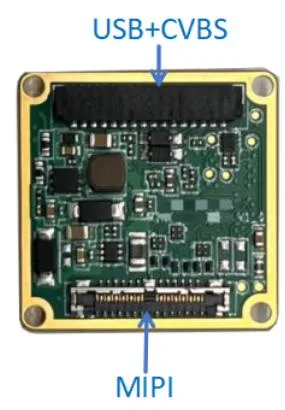
AeroMini USB + CVBS + MIPI tailboard
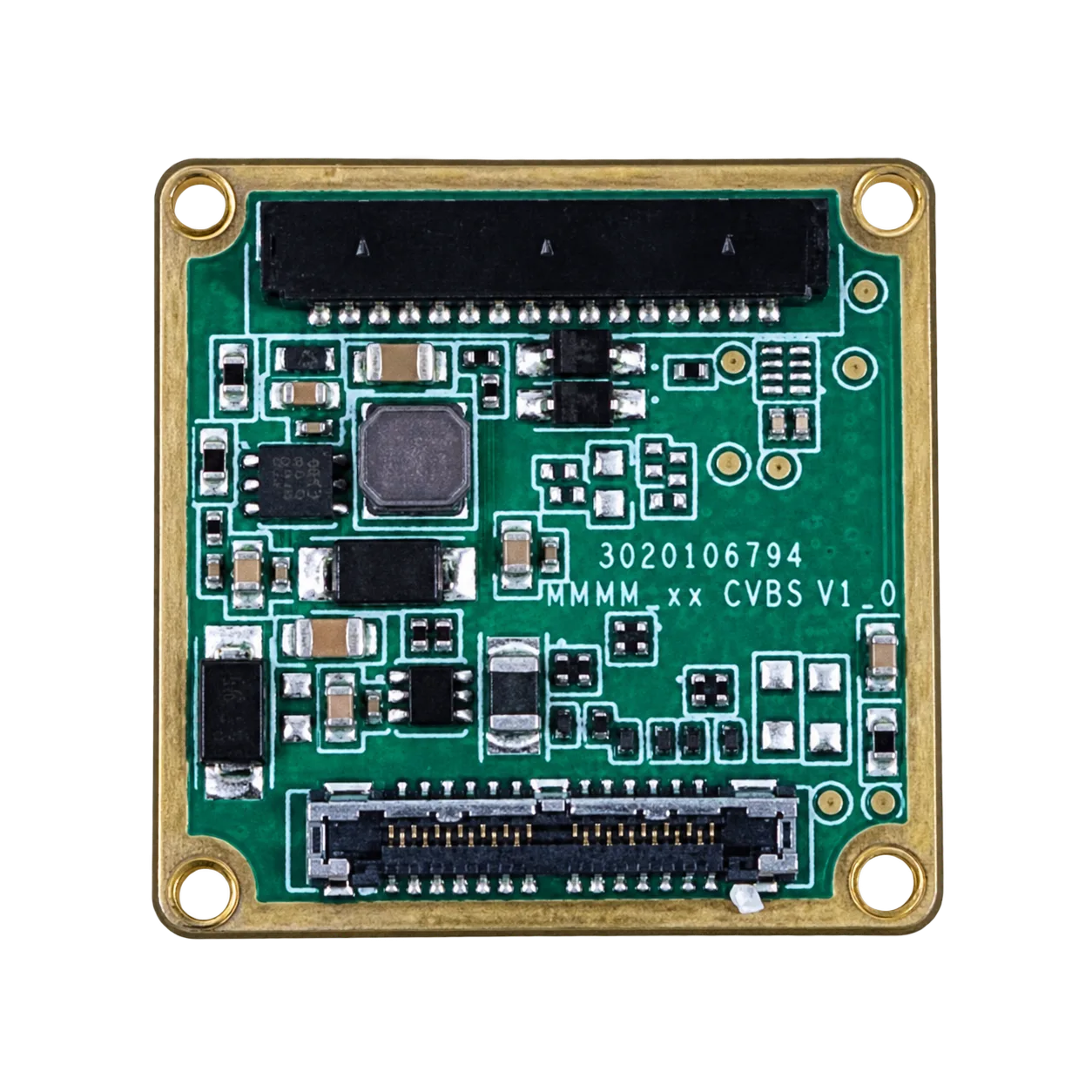
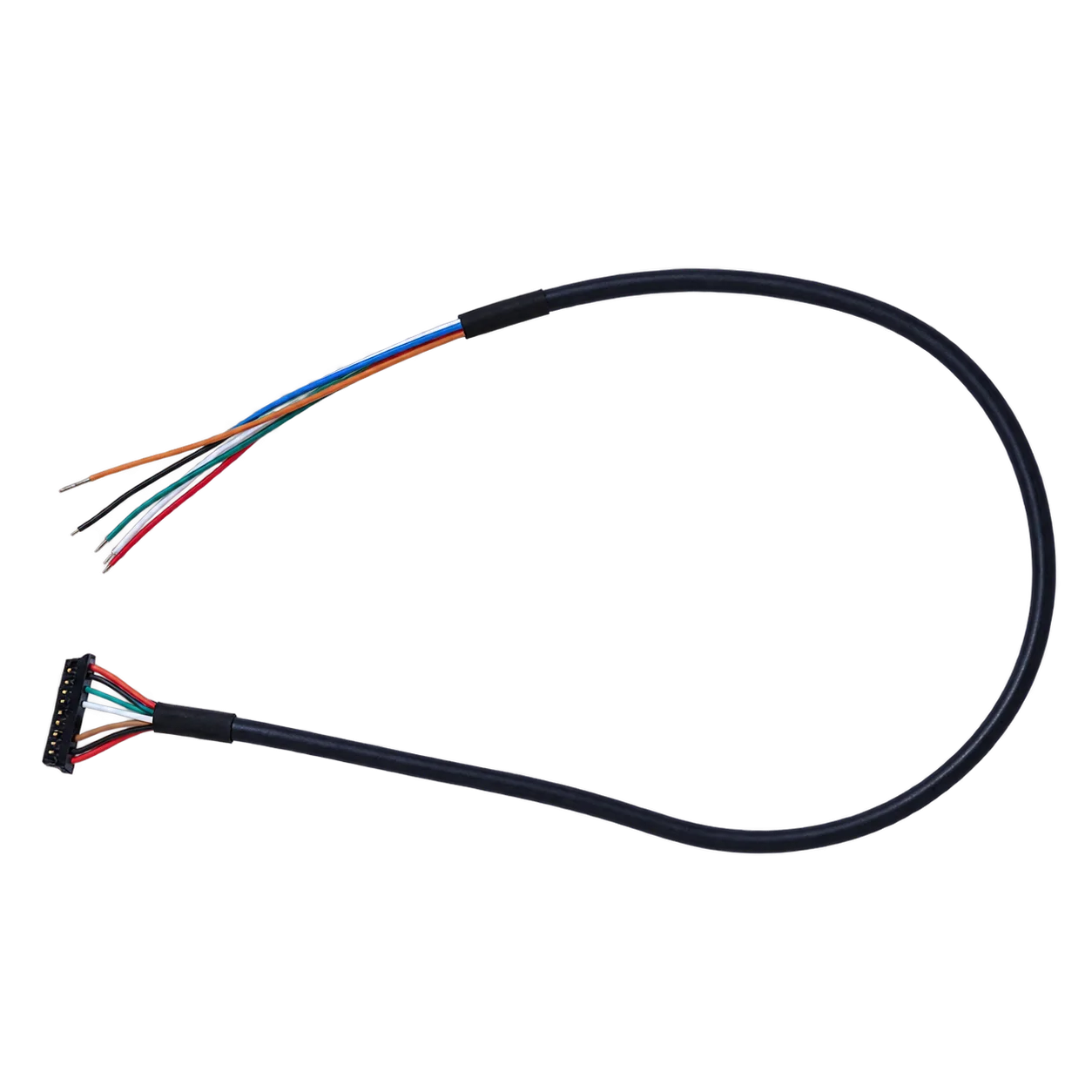
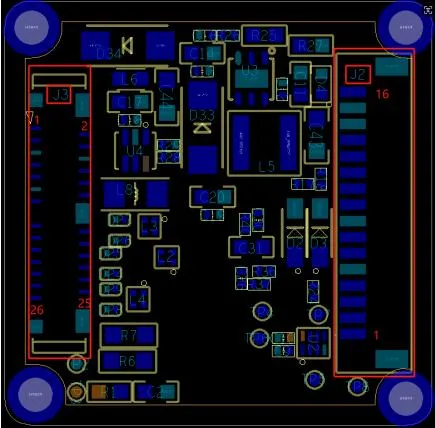
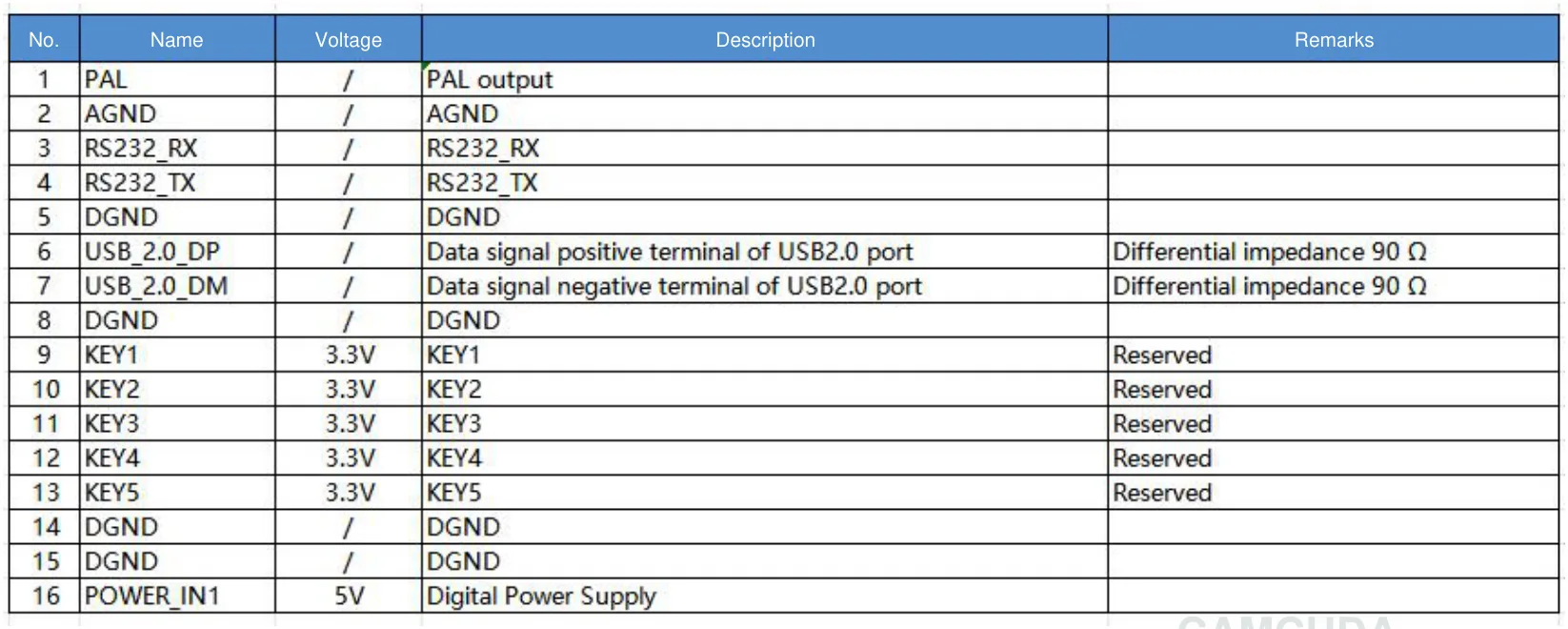
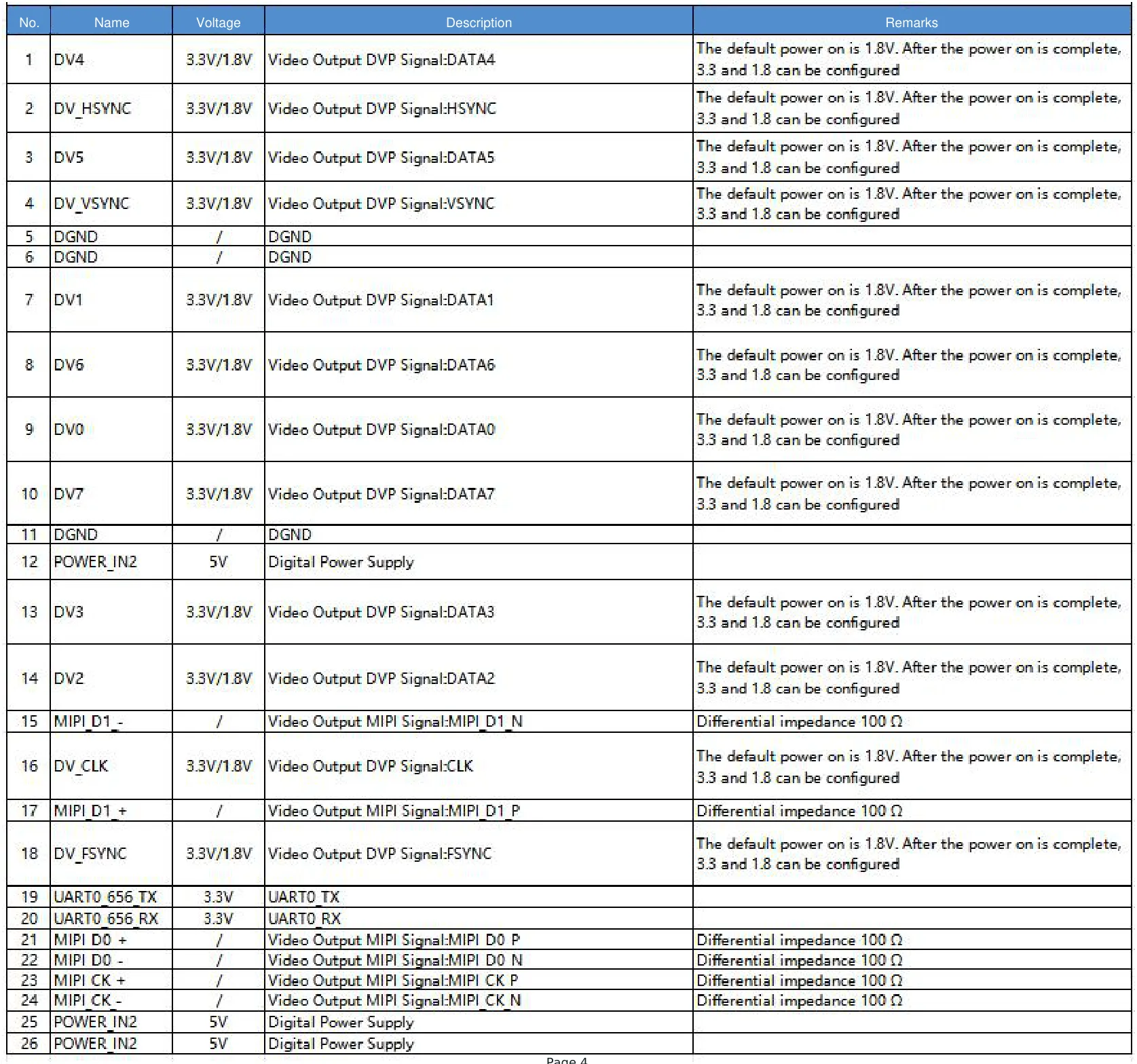
Locate the illustrated connectors using the official USB/CVBS and MIPI board connection overview and interface-board layout. The electrical schematics below are not physical mating views: do not infer plug orientation from the connector-symbol order.
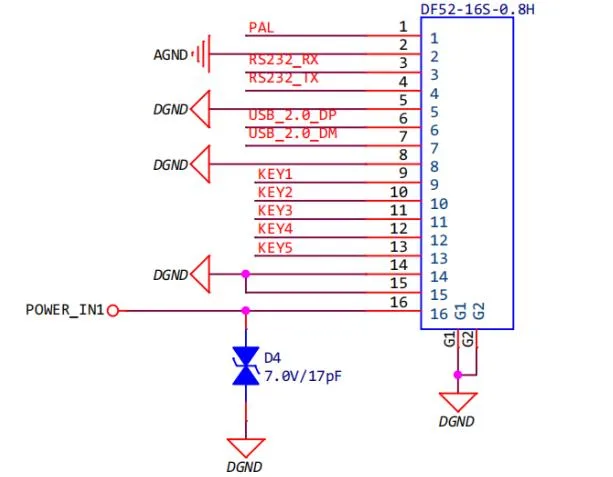
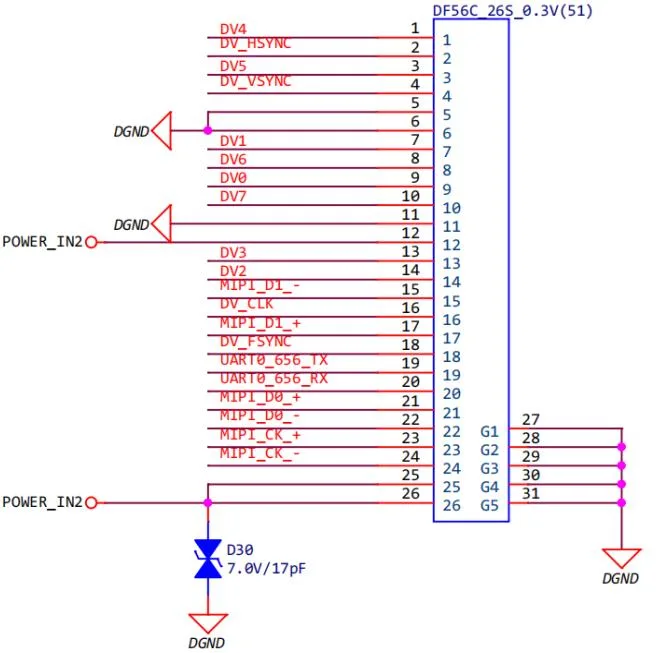
Electrical boundary: Do not apply 12 V to POWER_IN1 or POWER_IN2. These 16-pin and 26-pin references belong to the illustrated USB + CVBS + MIPI configuration, not the Type-C tailboard or SuperMini core. A slash in a signal table is not a zero-volt rating or permission to apply power. See the current AeroMini 640 datasheet for the source documentation.
AeroMini Type-C + CVBS tailboard
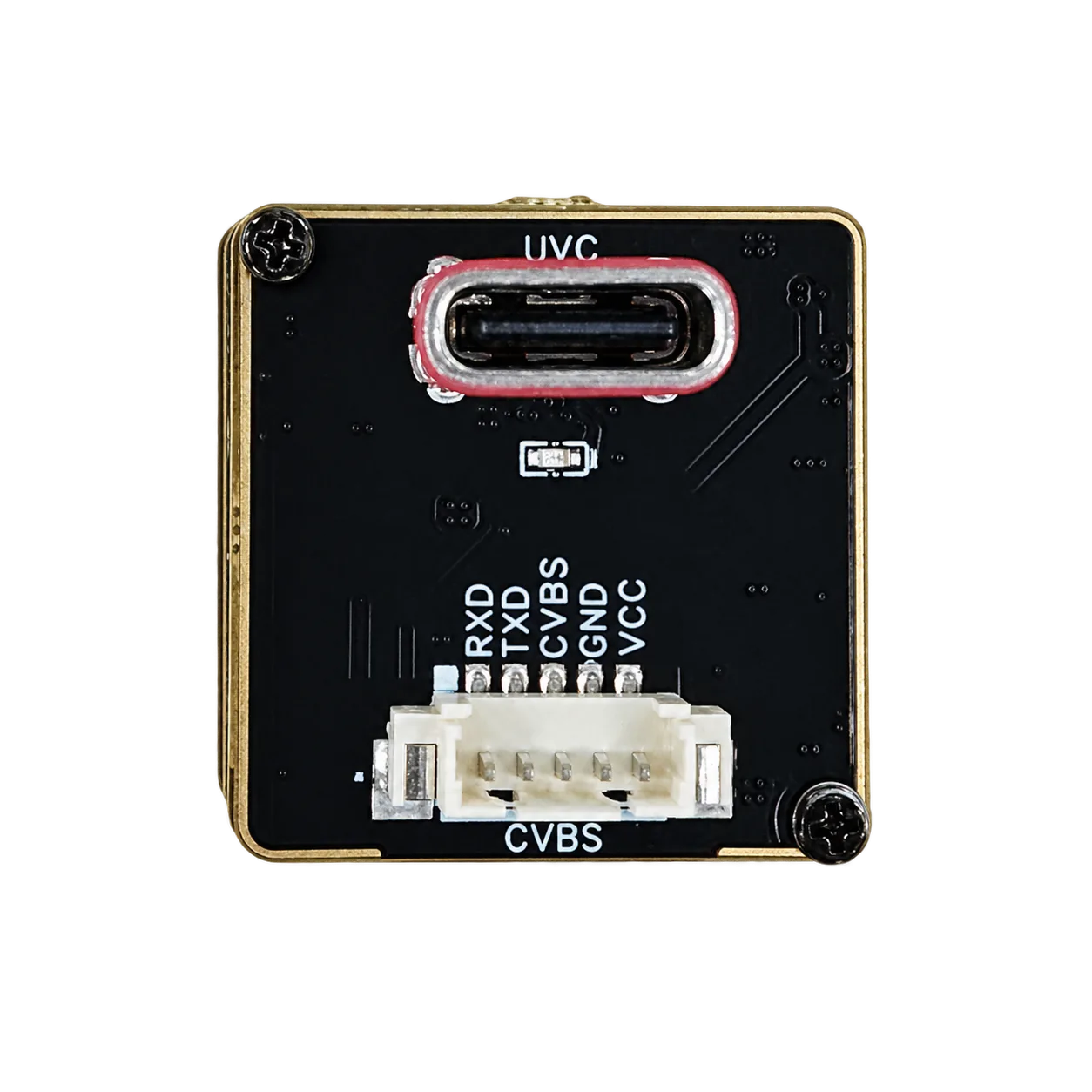
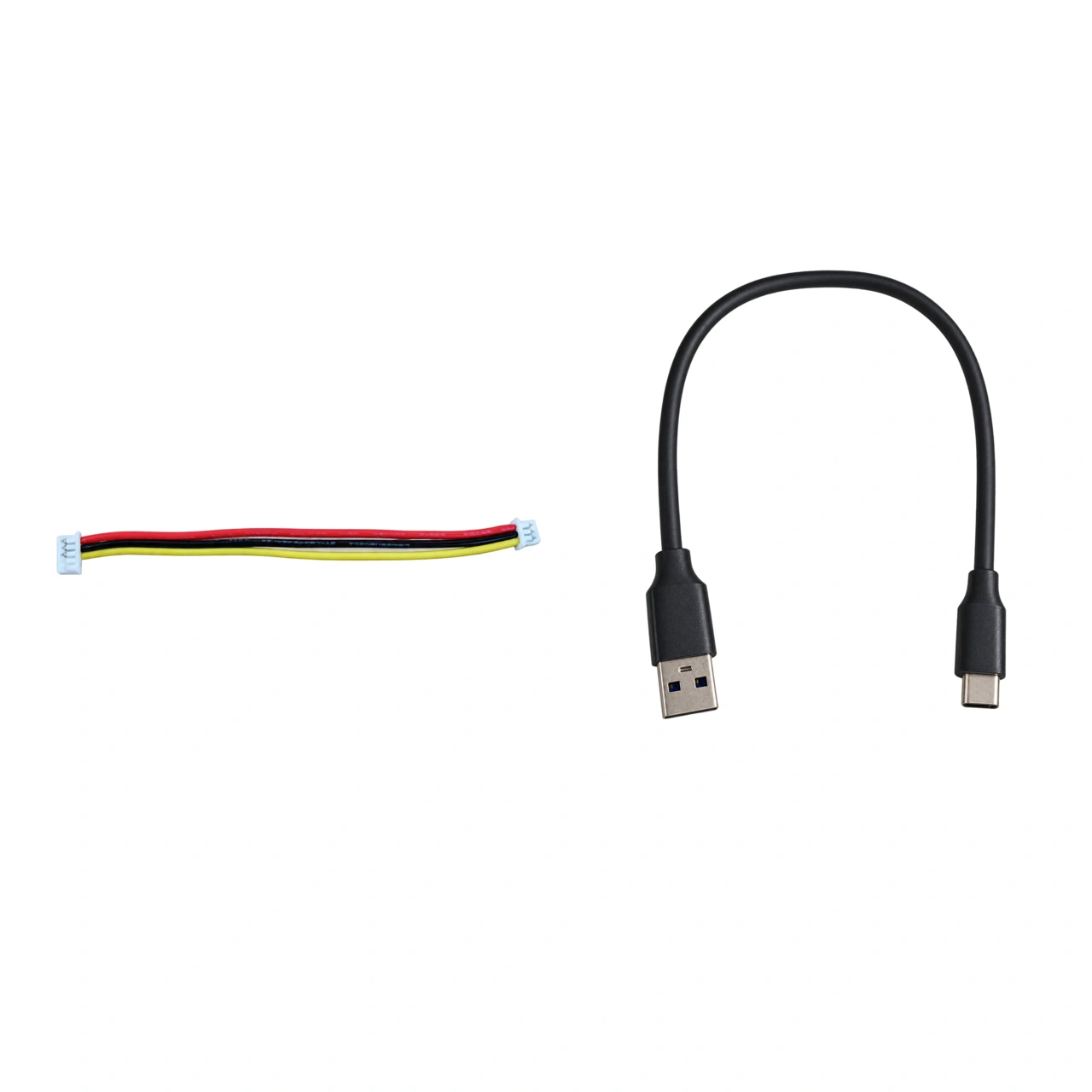
Use the separate Type-C wiring guide. Confirm connector orientation, pin numbering, allowable VCC voltage, conductor assignments and RX/TX direction before connecting this board. Neither the visible labels nor the cable colors establish those values; the three-wire harness photo is not a complete five-contact pinout. Do not reuse the 16-pin or 26-pin mapping above.
SuperMini 640 / 640T core 30-pin interface
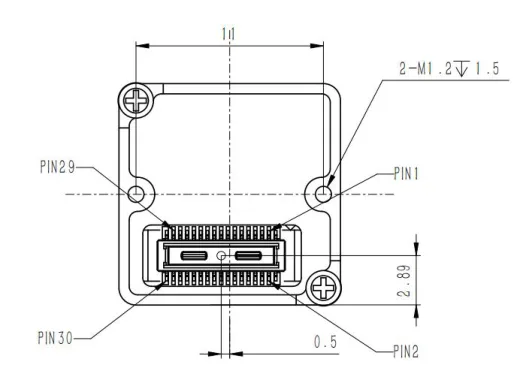
View Figure 3.1: SuperMini core 30-pin connector orientation in the official manual (Product Manual V1.0.0, PDF page 6; printed page 3). This drawing applies to the core interface without an expansion board.
Use the complete 30-pin signal table on PDF pages 6–7 (printed pages 3–4) of the official SuperMini 640 / 640T manual. Confirm all required supply rails and signal levels. The core definitions are not the wiring map for an optional USB or analog expansion board, a Type-C cable, or either AeroMini tailboard.
Interface mistakes that delay projects
- Choosing the module before confirming host input.
- Forgetting command/control interface.
- Assuming USB prototype equals final production architecture.
- Not planning cable routing and grounding.
Interface RFQ checklist
- Host processor and OS.
- Video path and control path.
- Latency and frame-rate expectation.
- Cable length and connector constraints.
- Prototype vs production quantity.
Need interface matching?
Compare Thermal Modules or send host details through Contact / RFQ.
FAQ about module interfaces
Which thermal camera module interfaces are easiest for prototypes?
USB is often practical for evaluation, but the final design may need another path.
Is RS-422 a video interface?
No. In this context it is part of communication/control planning, not the main digital video path.
Should I choose MIPI first?
Only if the host processor and software team can support it.
Can CVBS still matter?
Yes, for legacy analog workflows, but confirm image quality needs.
What should I send to CAMCUDA?
Host processor, OS, desired output, cable plan, and quantity.
Does interface affect enclosure?
Yes. Connectors and cable exits affect mechanical design.
Can one module support multiple interface paths?
AeroMini offers different interface-board configurations; confirm the outputs and frame rates for the chosen board, firmware and host. SuperMini BT656 and MIPI cannot operate simultaneously. Multiple interface names do not guarantee simultaneous output.
What is the biggest mistake?
Treating interface as an afterthought after mechanical design.
thermal camera module interfaces validation workflow before purchase
A practical thermal camera module interfaces validation workflow should start with a written requirement sheet. The sheet should name the application, target distance, lens/FOV expectation, host processor, interface path, power rail, mechanical envelope, operating environment, quantity range, and destination market. This simple document makes the supplier conversation more useful than a generic request for price.
For engineering teams, the second step is a bench test plan. Confirm whether the thermal camera module interfaces can produce usable video on the intended host, whether the control path is documented, whether the module can be powered safely, and whether the image settings are enough for the target scene. For procurement teams, the same test plan becomes a checklist for comparing samples and supplier responses.
The third step is a field or application simulation. A drone payload should be checked against weight, vibration, flight height, and reporting workflow. An outdoor system should be checked against enclosure, condensation risk, lens window, mounting position, and day/night operation. An OEM embedded system should be checked against PCB layout, cable exit, software integration, and future production repeatability.
Example RFQ language for CAMCUDA
Instead of writing only “please quote a thermal camera module interfaces,” use a more complete request: “We are building a thermal imaging product for [application]. The host platform is [processor/system]. We need [interface] output, [lens/FOV] target, [quantity] units, and the destination market is [region]. Please recommend a module path, drawing/document package, sample availability, and integration risks.”
This RFQ style improves technical matching and helps CAMCUDA respond with a useful product path. It also protects the buyer from comparing incompatible modules just because they share a similar resolution or product photo.
How to compare suppliers for thermal camera module interfaces
When comparing suppliers, avoid a spreadsheet that only lists price and resolution. A stronger thermal camera module interfaces comparison should include whether the supplier can provide product detail pages, drawings, interface notes, realistic lead-time discussion, media assets, and application guidance. A supplier that can explain integration risk is usually easier to work with than one that only sends a short quote.
For CAMCUDA buyers in Europe and North America, documentation and communication also matter. Ask whether the supplier can confirm the product model, clarify the interface, explain what is included in the module scope, and identify which requirements need engineering review. If the answer is vague, the project may still be possible, but the buyer should treat the quotation as incomplete.
Acceptance test checklist after samples arrive
- Confirm the shipped model matches the quoted thermal camera module interfaces path.
- Check basic power-up behavior with the intended host or evaluation platform.
- Verify video output and control communication before mechanical integration.
- Compare image output under at least two realistic scenes.
- Review mechanical fit with cable, mount, enclosure, and lens/window constraints included.
- Record questions for the supplier before moving to production quantity.
This acceptance step is especially important for thermal imaging projects because many issues do not appear in a product photo. The thermal camera module interfaces may look correct but still require interface adjustment, lens matching, or enclosure changes. Treat the first sample as an engineering validation tool rather than a final production approval.