cheapest 640×480 thermal camera core or module: the quote is only cheap if the interface survives
Procurement teardown for OEM thermal module buyers
cheapest 640×480 thermal camera core or module: the quote is only cheap if the interface survives
cheapest 640×480 thermal camera core or module is the kind of search that usually starts after a purchasing call, not after a clean engineering review. A buyer sees a low module price, forwards it to the payload or host-board engineer, and asks whether the sample can be ordered this week. Then the real questions arrive: 640-class or actually 640 x 512? USB or SPI? Is CVBS needed? What lens is assumed? Is there a drawing, interface note, or NDAA statement for the buyer’s document pack?
This article is written for teams that care about price but cannot afford a cheap sample that fails late. First decide whether the application needs compact lower-resolution sensing or 640-class imaging. For the 640-class branch, start with AeroMini 640 and compare SuperMini 640 when the core envelope is tighter. The useful buying decision is not “which one is cheaper?” It is “which cost belongs to the actual system?”
Sales contributors: Vivian, Lena and Sophie
Quick answer
The cheapest 640×480 thermal camera core or module is not always the lowest line item. If your product only needs compact embedded thermal sensing, a lower-resolution module may be the economical path. If your UAV payload, outdoor inspection device, or OEM camera needs 640-class thermal detail, start with AeroMini 640: 640 x 512 resolution, 21 mm x 21 mm x 28 mm dimensions and <20 g weight, both excluding lens and flange. Interface kits offer USB + CVBS + MIPI or Type-C + CVBS; UART, RS232 or RS422 control depends on the board. Compare SuperMini 640 for a smaller core envelope, with a different host-integration path. Confirm the selected board, lens, total assembly cost, documents, and NDAA statement availability during RFQ.
Why the cheapest 640×480 thermal camera core or module search gets messy
A procurement manager may say “640×480” because that phrase appears in marketplace listings, competitor pages, or old camera documents. In many LWIR module conversations, the available class is 640 x 512, 384 x 288, 256 x 192, 160 x 120, or another product-family resolution. That mismatch matters. If the buyer treats “640×480” as a price bucket instead of an engineering requirement, the quote can look cheaper than the system.
Google’s current helpful, reliable, people-first content guidance asks content teams to be clear about who the content is for, how it was created, and why it exists. For this article, the who is the OEM buyer or engineer under sample-order pressure. The how is today’s CAMCUDA product data, live sitemap context, and practical RFQ logic. The why is simple: a low thermal core quote is only useful if it produces a repeatable product path.
Rank Math’s post checks also reward basics such as focus keyword placement, metadata, link structure, and image alt text, but SEO structure cannot replace buyer clarity. A cheapest 640×480 thermal camera core or module article should help a buyer decide what to ask before money moves.
Two honest branches before comparing price
Branch A: low-cost embedded sensing
If the project is a compact appliance, HVAC monitor, smart device, low-power room sensor, or narrow-FOV embedded detection product, it may not need a 640-class image. A lower-resolution sensor, for example a 160 x 120 class device, may be economical if it satisfies the required thermal detail and host-processing task. Confirm its actual interface, supply, calibration and power budget rather than borrowing values from a different product. It is not a 640×480 module, and that is the point: sometimes the cheapest working architecture is the one that avoids unnecessary resolution.
For buyers comparing thermal imaging cores, this branch is worth reviewing when the product only needs thermal presence, heat distribution, room-condition monitoring, or compact scene awareness.
Branch B: 640-class UAV, outdoor, or OEM imaging
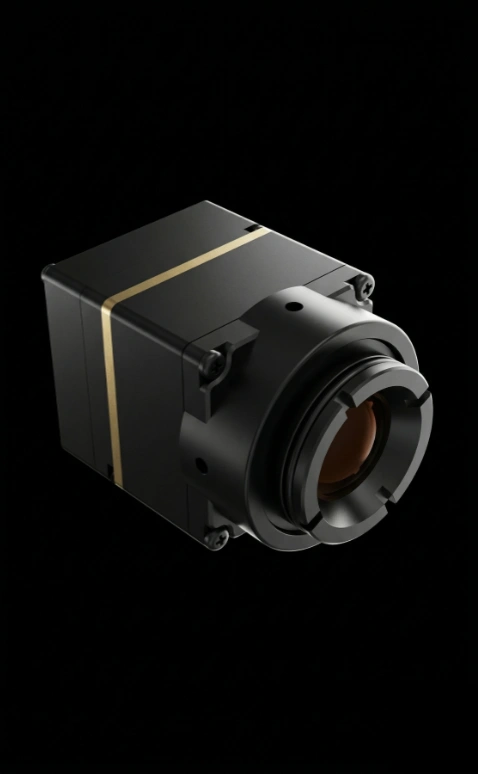
If the request really means a 640-class LWIR image for a UAV payload, outdoor inspection system, robotics platform, or OEM camera product, AeroMini 640 is the primary CAMCUDA branch to review. It is a 640 x 512 uncooled LWIR thermal imaging module with a compact module body and a choice of USB + CVBS + MIPI or Type-C + CVBS interface kits. Control uses UART, RS232 or RS422 depending on the board. Compare the configured lens, board, cable and host costs rather than assuming the bare-module quote covers a complete imaging system.
Lower-resolution sensing and 640-class imaging solve different jobs. Within the 640-class branch, AeroMini 640 is the primary configurable-module choice, while SuperMini 640 is worth comparing for a tighter core envelope. Both current product options are 640 x 512; they do not represent the lower-resolution and higher-resolution ends of the first decision.
cheapest 640×480 thermal camera core or module comparison chart
| Decision point | Lower-resolution sensing branch | 640-class imaging branch |
|---|---|---|
| Best-fit buyer question | Can we add compact thermal sensing without needing a detailed image? | Can we build a compact 640-class thermal imaging payload or OEM camera? |
| Resolution | For example, 160 x 120 class; validate the minimum detail required | 640 x 512 for the AeroMini and SuperMini options below |
| Primary integration path | Sensor-specific host interface; verify the selected device | Board/host-dependent video and control; compare the two current product tables below |
| Power direction | Confirm sensor, host and board power for the required sensing task | Budget module/core, interface board, host and transmission hardware separately |
| Field of view | Match the selected sensor and optics to target size and distance | Confirm lens and FOV for the exact module and application during RFQ |
| Analog video note | Do not assume the selected sensing device provides a display-video output | Confirm the board and any analog-output circuitry required for CVBS |
| Typical use | Smart devices, HVAC and compact sensing where lower resolution is sufficient | UAV payloads, outdoor inspection, embedded vision, OEM thermal imaging |
| Procurement risk | Under-buying resolution or missing host-board details | Ignoring payload enclosure, video path, lens, and document requirements |

SuperMini bare-core mechanical reference: see Product Manual V1.0.0, Figure 4.1 (PDF page 13) for the official dimensioned drawing of the core without a lens or expansion board. Confirm the complete configured assembly before machining.
AeroMini assembly drawing: the current AeroMini datasheet provides interface-board layout and connector references, but no dimensioned assembly drawing. Request the drawing for the selected AeroMini lens, flange and interface-board assembly, including cable clearance. The linked SuperMini drawing does not apply to AeroMini.
Featured product parameter tables within the 640-class branch
AeroMini 640: primary configurable 640×512 imaging option
AeroMini 640 is the primary 640-class option for configurable UAV/OEM imaging. The table below describes the imaging model, which does not measure temperature. A separate 25 Hz radiometric version is available for supply enquiries only; confirm availability and the temperature-data path independently. Request a quote for the actual lens, board and cable configuration.
| Product model | AeroMini 640 imaging |
|---|---|
| Detector type | Vanadium oxide uncooled infrared focal plane detector |
| Resolution / pixel pitch | 640 x 512 / 12 um |
| Spectral range | 8-14 um |
| Imaging frame rate | 60 Hz factory default; 30 Hz factory option. Confirm output rate for the selected interface and host |
| NETD | <=30 mK @ 25 deg C, F#1.0 |
| Video interface kits | USB + CVBS + MIPI or Type-C + CVBS; outputs and formats depend on the selected board and firmware |
| Communication | UART, RS232 or RS422, depending on the interface board; confirm protocol and electrical levels |
| Supply voltage | 5 V or 12 V, board-dependent; documented POWER_IN1 / POWER_IN2 pins accept 5 V only. Never apply 12 V to those pins |
| Typical power consumption | <0.5 W module consumption @ 25 deg C; full-kit consumption may differ. Budget interface hardware separately |
| Module weight | <20 g, excluding lens and flange |
| Dimensions | 21 mm x 21 mm x 28 mm, excluding lens and flange |
| Operating temperature | -40 deg C to +80 deg C |
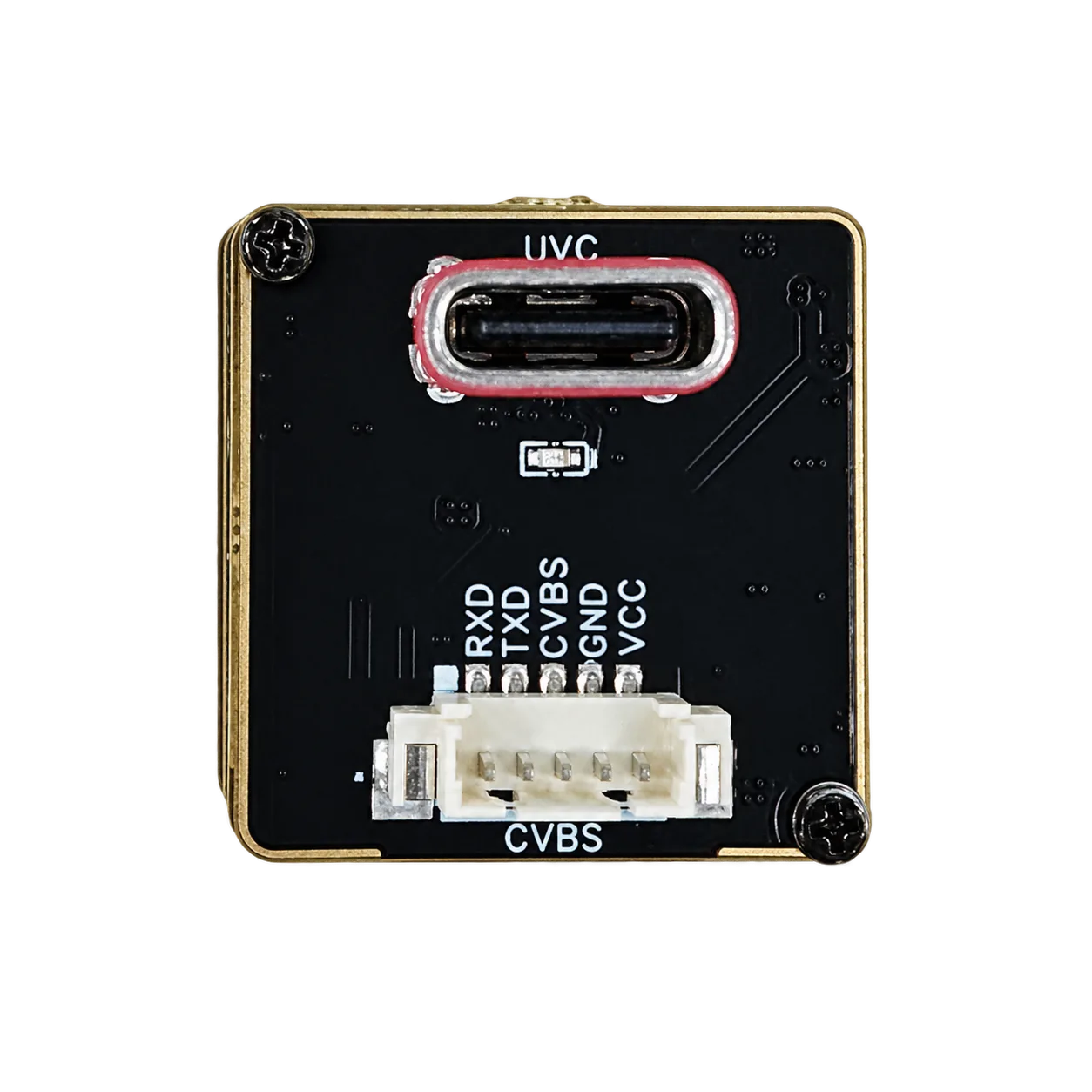
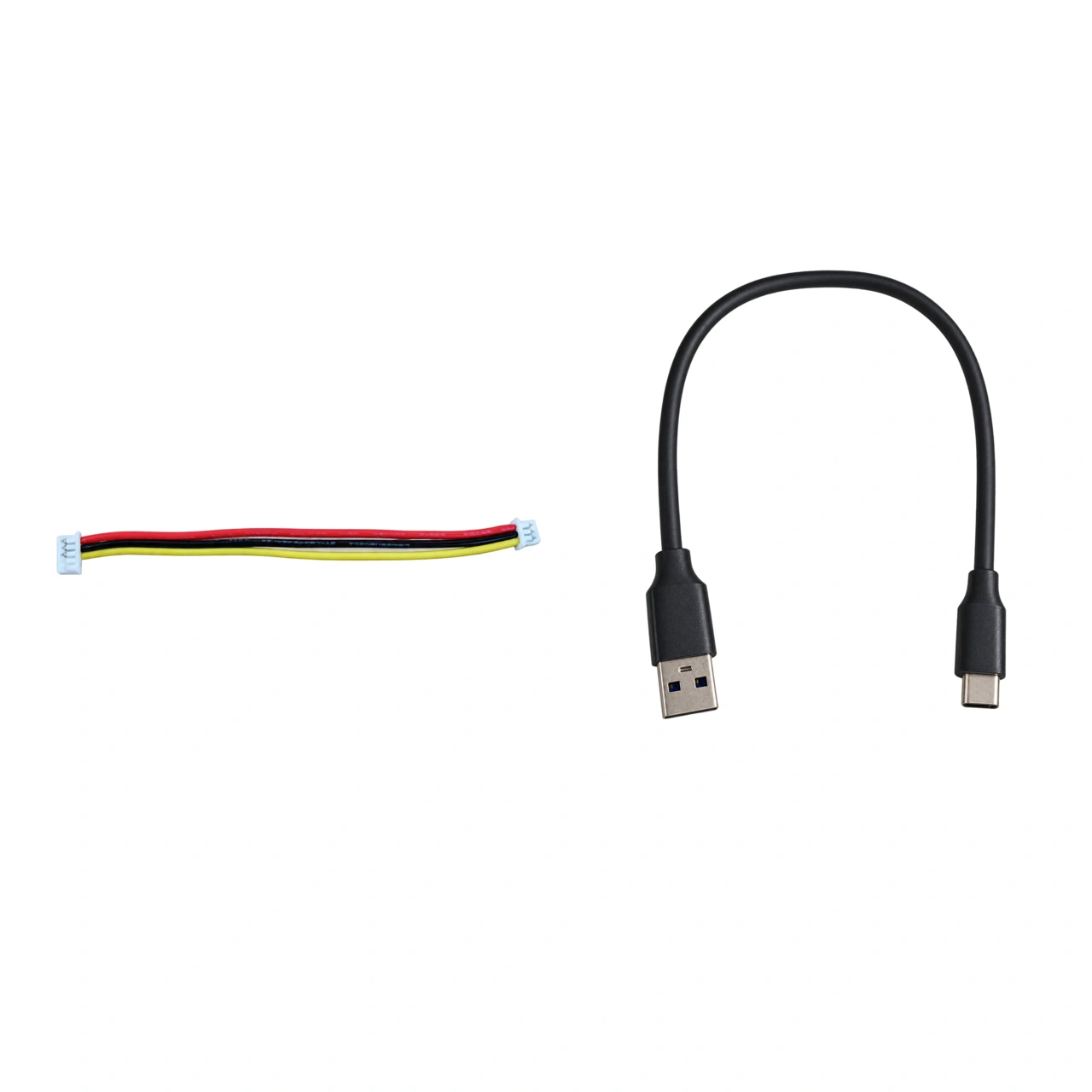
AeroMini Type-C + CVBS cable reference: compare the quoted kit with the actual Type-C board photograph. The photograph shows a UVC socket and RXD, TXD, CVBS, GND and VCC labels; it does not establish pin numbering, supply voltage or RX/TX direction.
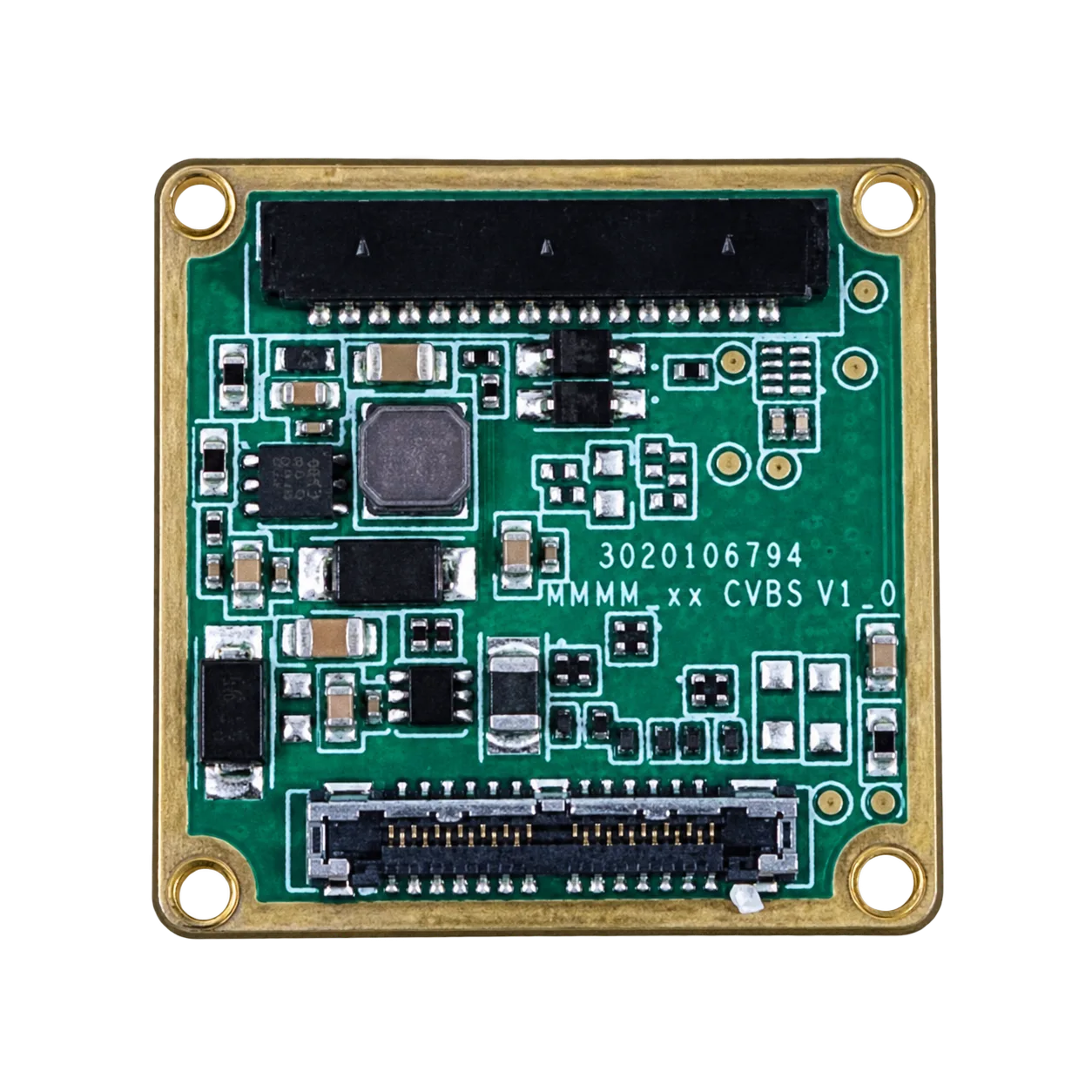
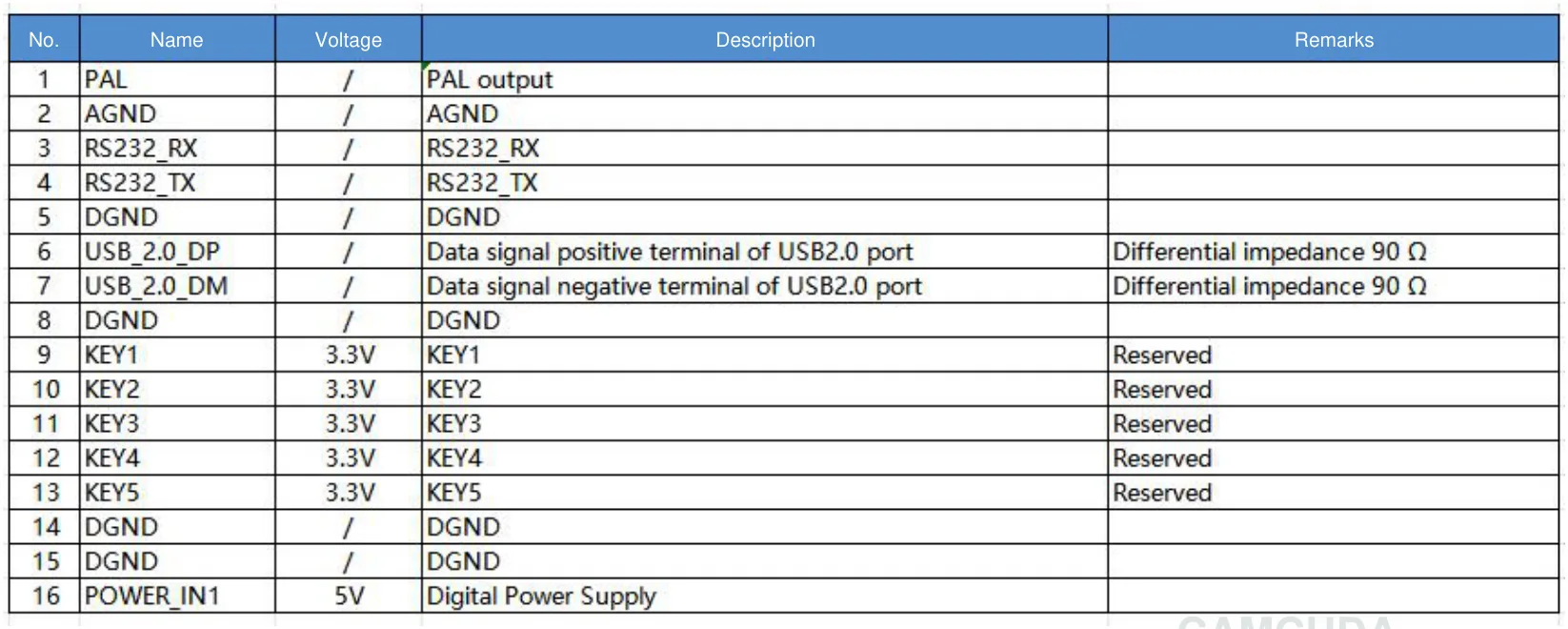
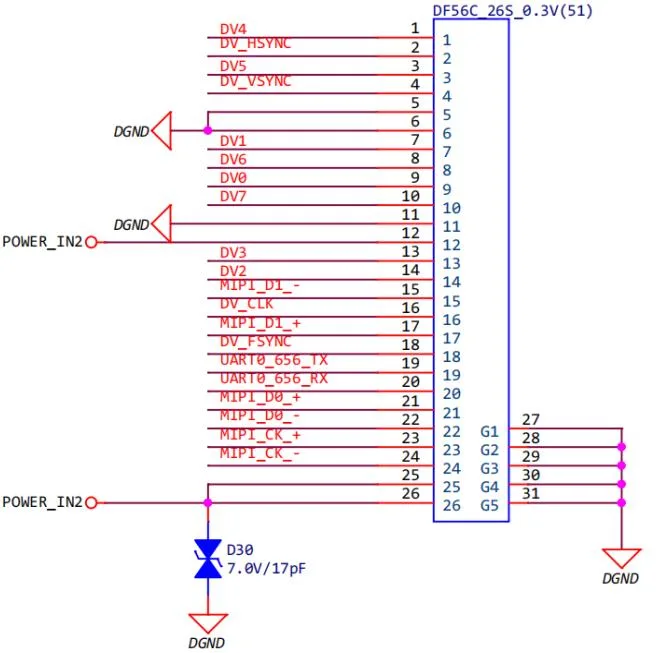
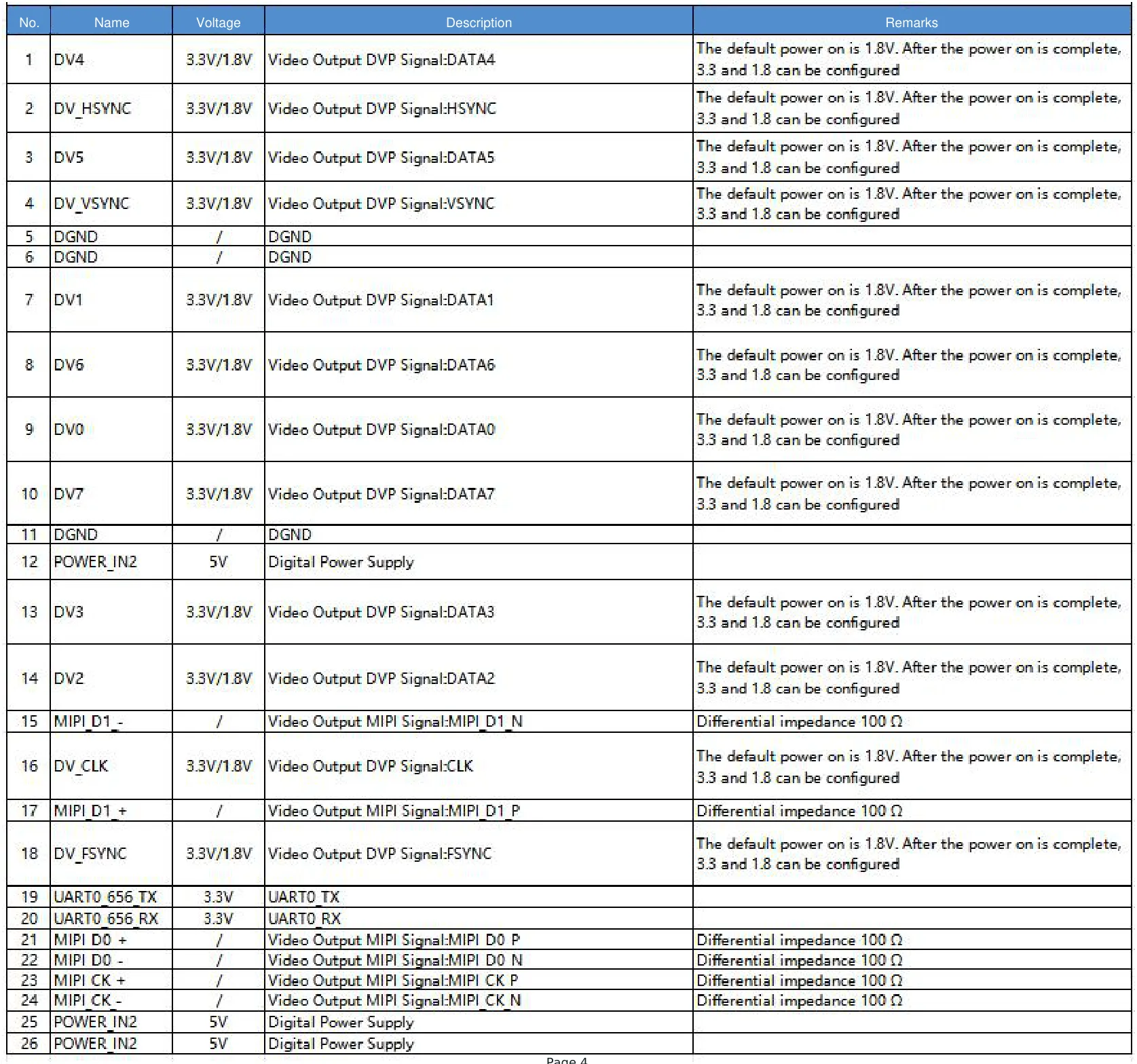
USB + CVBS + MIPI alternative: this uses a different tailboard and customer-soldered cable. Its 16-pin electrical schematic and complete 16-pin signal table, plus the 26-pin electrical schematic and complete 26-pin signal table, are provided with the AeroMini datasheet. Match the illustrated board revision and connector orientation; these electrical diagrams are not physical mating views and must not be applied to the Type-C board.
SuperMini 640: compact-core 640×512 imaging comparison
SuperMini 640 is a compact-core comparison when the project can support its host-interface and power-rail requirements. It is also 640 x 512, not a lower-resolution sensing substitute. The table describes SuperMini 640 imaging; SuperMini 640T is the separate 30 Hz thermographic model. Neither imaging-only model measures temperature. Confirm the chosen model, board, lens and sample availability; a parent listing does not guarantee stock for every configuration.
| Product model | SuperMini 640 imaging |
|---|---|
| Detector type | Vanadium oxide uncooled infrared focal plane detector |
| Resolution | 640 x 512 |
| Pixel pitch | 8 um |
| Spectral range | 8-14 um |
| Imaging frame rate | 50 Hz; confirm the selected output, firmware and host configuration |
| NETD | <=40 mK @ 25 deg C, F#1.0 |
| Digital video | 8-bit LVCMOS / BT656 and 2-lane MIPI; BT656 and MIPI cannot operate simultaneously. USB requires an optional expansion board |
| Communication | UART with 1.8 V logic; match host electrical levels and protocol |
| Analog video | CVBS signal requires an external video-buffer IC; confirm the actual output assembly |
| Supply voltage | MAIN_POWER 3.8-5.2 V plus separate regulated 3.3 V and 1.8 V rails; confirm noise limits and power-on timing |
| Typical power consumption | <=0.5 W core consumption @ 25 deg C, excluding expansion board |
| Core weight | <3.5 g, excluding lens, flange and user expansion board |
| Dimensions | 13 mm x 13 mm x 13.4 mm, excluding lens, flange and user expansion board |
| Operating temperature | -40 deg C to +70 deg C for the imaging model; confirm thermographic conditions separately |
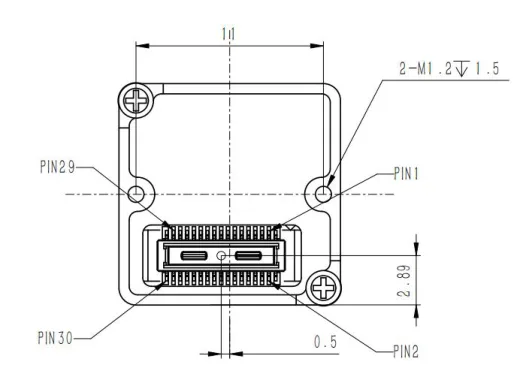
SuperMini 30-pin core-connector reference: see Product Manual V1.0.0, Figure 3.1 (PDF page 6) and the complete pin table on PDF pages 6–7 for the official connector orientation and signal definitions. Follow the manual’s power requirements. These definitions apply to the factory core without an expansion board; they do not define AeroMini wiring or optional SuperMini expansion-board connector assignments.
Application case: the purchasing call before the sample order
A small OEM is building an outdoor inspection device for service crews. The first purchasing request says: “Find the cheapest 640×480 thermal camera core or module.” Engineering joins the call and asks three questions. Does the device need a thermal image for a technician, or only thermal sensing for a host algorithm? Does the enclosure have room for a 640-class lens and board stack? Will the buyer need a document pack for a North America customer?
The answer changes the product branch. If the device only needs narrow-FOV sensing and low power, a lower-resolution sensor may be worth evaluating before paying for unnecessary image detail. If the device needs a higher-detail thermal image, outdoor field workflow, or UAV-adjacent payload path, AeroMini 640 becomes the primary imaging option to review; compare SuperMini 640 when the available core space is tighter and the host can support its integration requirements. If the same project may become a UAV payload, CAMCUDA’s drone thermal camera application page helps frame payload constraints. If the use case is field patrol, utility yards, or rugged outdoor monitoring, the outdoor field thermal imaging page is the more natural next step.
FAA small UAS Part 107 resources are not a module specification, but they are a useful reminder for drone-adjacent buyers: field deployment brings operational responsibilities. Do not let a cheap thermal module quote ignore the actual deployment path.
Common mistakes in cheapest 640×480 thermal camera core or module RFQs
- Using 640×480 as a vague price phrase. Confirm the actual required resolution and whether a 640 x 512 branch is acceptable.
- Comparing a sensing module against an imaging payload module. First decide between lower-resolution sensing and 640-class imaging. AeroMini 640 and SuperMini 640 are both options within the latter branch.
- Asking for price before interface. Name SPI, USB, RS-422, CVBS analog output on applicable configurations, or other host needs early.
- Ignoring lens and enclosure fit. The module price does not include every optical, bracket, window, and cable decision.
- Waiting too long on documents. Ask for drawings, interface references, compliance-related materials, and NDAA statement availability during RFQ.
- Assuming marketplace prices equal production cost. Samples, support, repeatability, configuration, and export documents can change the real cost.
RFQ checklist for a low-price thermal core search
- State whether the request is true 640-class imaging, lower-resolution sensing, or an open product-selection question.
- Describe the application: embedded device, UAV payload, outdoor field inspection, industrial monitoring, smart appliance, robotics, or security monitoring.
- List target size, working distance, desired FOV, enclosure window limits, and lens preference if known.
- Name the required video and control paths, then match the exact model and board. AeroMini interfaces are board-dependent; SuperMini needs a compatible core interface or optional expansion board. Confirm cables, electrical levels and host requirements.
- Share power budget, board space, connector preference, firmware expectations, and software/SDK needs.
- Request datasheet, mechanical drawing, interface reference, and sample-order documentation.
- For North America procurement, government-adjacent inspection, drone payload, security monitoring, or industrial monitoring, ask for NDAA statement availability.
- Include prototype quantity, target annual quantity, destination market, and timing.
Ask CAMCUDA for the product branch, not just the price
If your team is searching for the cheapest 640×480 thermal camera core or module, send CAMCUDA the application, interface path, resolution target, power budget, enclosure constraints, document needs, and sample quantity. For 640-class UAV/OEM imaging, start with AeroMini 640 and compare SuperMini 640 for a tighter core envelope. Review the uncooled thermal modules category for neighboring options, and the downloads and FAQ pages before you contact CAMCUDA for an RFQ.
FAQ
What is the cheapest 640×480 thermal camera core or module for an OEM project?
The answer depends on whether the project truly needs 640-class imaging. If lower-resolution thermal sensing is enough, a compact sensor may be more economical. If the project needs 640-class thermal detail, start with AeroMini 640 and compare SuperMini 640 for a tighter core envelope. Confirm the complete integration package and current quotes during RFQ; neither model is claimed here to have the lowest price.
Are the current product options compared here actually 640×480?
No. AeroMini 640 and SuperMini 640 are both 640 x 512. This article treats 640×480 as buyer search language, first separates lower-resolution sensing from 640-class imaging, and then compares two current 640-class options. Confirm whether the host and application can use 640 x 512 before ordering; do not assume it is an identical format to 640×480.
Why compare AeroMini 640 with SuperMini 640?
Both provide 640 x 512 imaging, but their integration paths differ. AeroMini offers configurable interface kits; SuperMini has a smaller published core envelope and specific power-rail and host-interface requirements. Their published size and weight exclusions differ, so compare the configured assembly, engineering effort and full system cost rather than treating the bare-core numbers as complete payload specifications.
Is AeroMini 640 a complete drone camera?
No. AeroMini 640 is a compact uncooled LWIR thermal imaging module for OEM integration. The final drone payload still needs lens/FOV selection, enclosure, cable routing, payload bracket, host electronics, video path, and field validation.
Should a low-cost module RFQ include CVBS?
Include CVBS when the system may use analog video for a display, recorder, transmitter, UAV downlink, embedded retrofit, or low-latency monitoring path. CAMCUDA can support CVBS analog output on applicable configurations, and buyers should confirm it during RFQ.
What documents should procurement request before sample payment?
Ask for datasheet, mechanical drawing, electrical interface reference, product specifications, compliance-related materials where applicable, and NDAA statement availability when the buyer’s market or customer requires it.
Can a cheaper lower-resolution thermal module replace a 640-class core?
Only when the application does not need 640-class image detail. For thermal presence, compact sensing, or simple heat-distribution awareness, lower resolution may be enough. For UAV payloads, outdoor inspection, or operator viewing, under-buying resolution can create a second sample order.
What should engineers send CAMCUDA with the first RFQ?
Send the application, resolution target, working distance, FOV need, host interface, power budget, mechanical space, connector constraints, documentation requirements, destination market, prototype quantity, and expected production quantity.
How does Rank Math affect this kind of article?
Rank Math helps check title, focus keyword, meta description, URL, links, and image alt text. Those checks are useful, but the article still has to answer a real buyer decision. For this topic, that decision is whether the low quote fits the actual module branch and integration path.