oem taa camera solutions: 7 Reliable RFQ Notes When Thermal Payload Documentation Gets Complicated
Procurement memo for OEM thermal payload buyers
oem taa camera solutions: 7 Reliable RFQ Notes When Thermal Payload Documentation Gets Complicated
A sourcing manager asks for oem taa camera solutions at 4:40 p.m., and the engineering lead answers with a thermal module datasheet. That is usually where the first mistake starts. The buyer is not only asking whether a camera can see heat; they are asking whether the sample, documents, interface path, and supplier response can survive a procurement review without being rewritten three times.
Quick answer
oem taa camera solutions should be handled as an RFQ and documentation conversation, not as a loose product label. For CAMCUDA thermal modules, ask for the exact model and configuration, intended use, destination market, interface path, lens/FOV needs, and the documents the buyer needs to review. Ask which model- and configuration-specific NDAA-related documents are available if the buyer requires them. Do not assume public product pages prove TAA status. Confirm project documentation during RFQ.
oem taa camera solutions: why the wording gets risky
In many RFQs, the phrase oem taa camera solutions is not precise enough. One buyer may mean TAA-related sourcing documentation. Another may mean NDAA review. A third may simply be screening for a supplier that can support North America procurement paperwork without slowing the sample order.
The practical trade-off is uncomfortable: a team wants to keep the RFQ short so suppliers respond quickly, but a short RFQ often hides the exact questions that make procurement reject the sample later. Thermal payload projects add another layer because the camera module is usually only one part of a larger drone, outdoor monitoring, robotics, or embedded vision system.
A useful procurement file records the source, date, model, configuration, and scope of each document. Ask sourcing and engineering to review the same sample configuration, flag missing records before ordering, and keep the supplier’s response with the RFQ. That is more useful than treating a product description as a complete documentation review.
Industry context points in the same direction. NVIDIA’s physical-AI coverage describes Jetson deployment in robotics and industrial systems, while Micron’s edge AI writing discusses memory and storage for processing data locally. These are general host-system examples, not capabilities of the thermal module. For a thermal module buyer, the procurement file and the video path belong in the same conversation. A camera that fits the paperwork but misses the host interface is not ready. A camera that streams well in the lab but lacks the requested documentation may also stall.
RFQ selection chart for procurement and engineering
| RFQ note | What to ask | Why it matters | CAMCUDA wording |
|---|---|---|---|
| 1. Documentation scope | Which NDAA-related statements, CE/RoHS/ISO-related records, drawings, or interface references does the buyer request? | Procurement requirements vary by buyer and destination market. | Ask which documents are available for the selected model and configuration, destination, and intended use. |
| 2. Compliance language | Is the buyer asking for TAA, NDAA, country-of-origin, or internal vendor-screening documents? | These are not interchangeable labels. | Do not infer TAA status from a product page; request the exact document needed. |
| 3. Video path | Which USB, MIPI, DVP, or CVBS path is required on the selected board? | The interface affects host board, recorder, transmitter, and latency planning. | Specify the AeroMini USB + CVBS + MIPI kit, then confirm output format, rate, and any simultaneous-output requirement. |
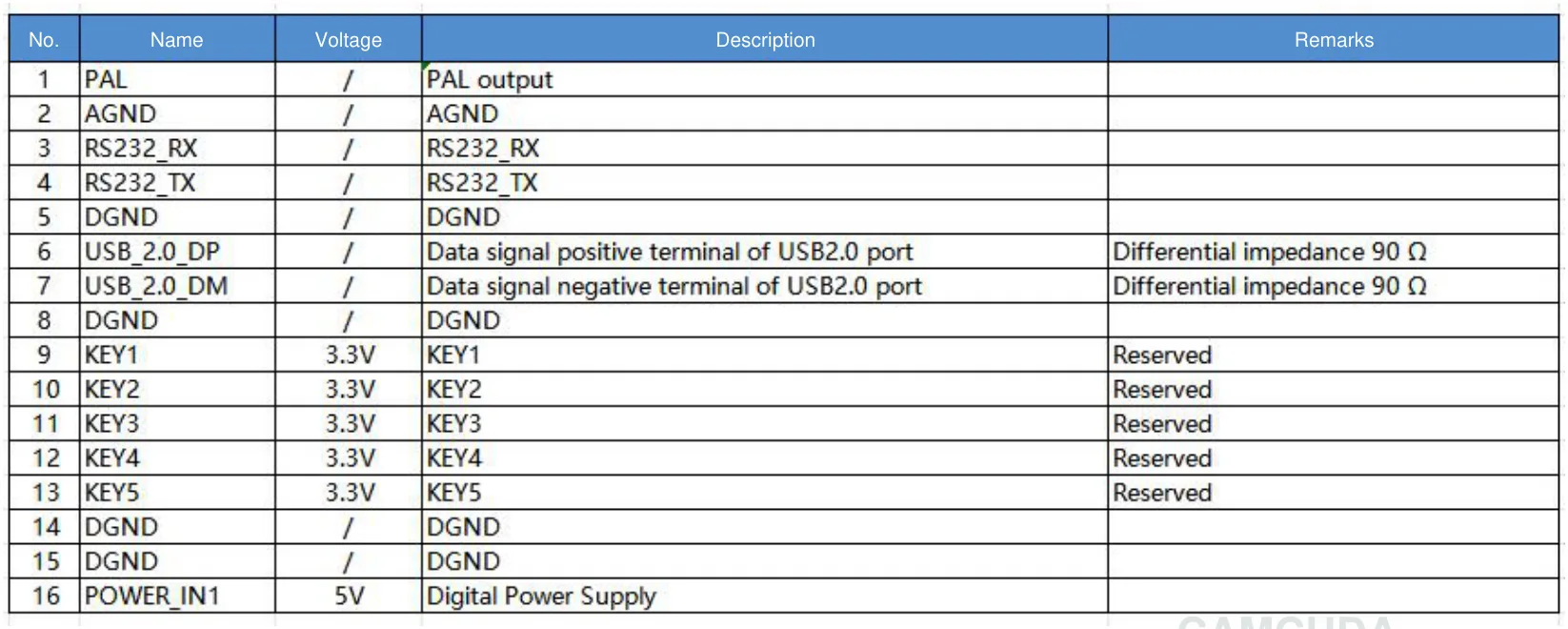
| 4. Control path | Which serial connector, electrical levels, and commands does the host require? | Thermal settings and command paths may need separate review from video. | The illustrated 16-pin guide labels RS232; the 26-pin guide lists 3.3 V UART. USB video does not establish USB serial or default RS422. |
| 5. Application environment | Drone payload, fixed outdoor monitoring, handheld device, robotics, or industrial inspection? | Weight, enclosure, vibration, power, and FOV priorities change by use case. | Record the actual deployment, enclosure, mounting, vibration, and complete assembly mass limits. |
| 6. Sample acceptance | What must be true before the sample is considered usable? | A sample can look good and still fail procurement or integration review. | Define video output, documentation, lens path, mechanical envelope, and support materials. |
| 7. RFQ owner | Who signs off: sourcing, engineering, compliance, or field operations? | Late reviewers create repeated quote revisions. | Send one combined RFQ rather than separate vague requests. |
Current configuration facts to anchor the discussion
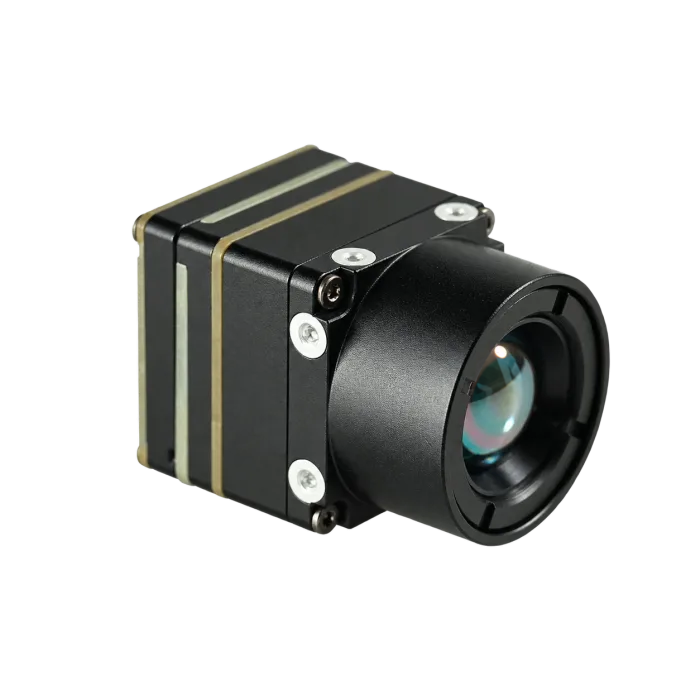
For a concrete evaluation, use the CAMCUDA AeroMini 640×512 Uncooled LWIR USB Thermal Camera Core with a 9 mm lens, the non-radiometric imaging version, and the USB + CVBS + MIPI tailboard. The factory default is 60 Hz, with 30 Hz available as a factory option; specify the rate before ordering. This version does not measure temperature. The public product page supports product-level evaluation; project documentation still needs RFQ confirmation.
| Product / configuration | CAMCUDA AeroMini 640×512; 9 mm lens; non-radiometric imaging; USB + CVBS + MIPI tailboard |
|---|---|
| SKU | AEROMINI-640-9MM; state camera version, factory frame rate, and interface package separately in the RFQ |
| Pricing basis | Use the current configurator or quotation for the selected lens, camera version, interface package, quantity, and delivery terms |
| Detector | Vanadium oxide uncooled infrared focal plane detector |
| Resolution | 640 x 512 |
| Pixel pitch | 12 um |
| Spectral range | 8-14 um |
| NETD | ≤30 mK at 25 °C, F/1.0 |
| Factory frame rate | 60 Hz default / 30 Hz factory option for non-radiometric imaging; confirm the rate of each required output |
| Digital video | Selected USB + CVBS + MIPI package; confirm host, format, firmware, and output rate. DVP availability requires configuration review |
| Control communication | Illustrated 16-pin guide: RS232; 26-pin guide: 3.3 V UART. Confirm the ordered board and commands; USB video is not evidence of USB serial or default RS422 |
| Analog video | CVBS on the selected package; confirm PAL/NTSC, wiring, and the required output combination during RFQ |
| Board power inputs | Illustrated 16-pin POWER_IN1 and 26-pin POWER_IN2: 5 V inputs; do not apply 12 V. Confirm the approved input for the ordered board |
| Typical module power | <0.5 W at 25 °C; complete-kit consumption may differ |
| Weight | <20 g without lens and flange; budget the complete assembly separately |
| Dimensions | 21 × 21 × 28 mm without lens and flange; request the ordered lens/board assembly drawing |
| Operating temperature | −40 °C to +80 °C |
If the buyer is comparing broader module families, start with thermal imaging cores and thermal modules, then move into the exact product configuration when the RFQ needs a concrete model.
Application case: one RFQ for a utility inspection payload
An illustrative example: a North America integrator wants a light thermal module for utility yard patrol and occasional UAV inspection. The mechanical team starts from AeroMini’s published <20 g mass without lens and flange, then budgets the selected lens, board, cables, enclosure, and mount as a complete assembly. The software team wants USB video for a prototype. Field operations still asks whether an analog video transmitter path is possible for a legacy monitor, and procurement asks for documentation before a pilot order.
This is where oem taa camera solutions becomes a handoff problem. The RFQ should not simply say “send TAA camera.” It should say: intended application is utility inspection and outdoor site monitoring; preferred configuration is AeroMini 640, 9 mm, non-radiometric, 60 Hz factory default or a specified 30 Hz factory option, with the USB + CVBS + MIPI board; USB video is required for the prototype; CVBS may be needed for a legacy display path; ask which NDAA-related documents are available if the buyer requires them; documentation and interface references should be confirmed before sample shipment. Acceptance should cover stable video on the intended host and display, the complete assembly mass and mounting envelope, representative outdoor scenes, and the requested document set. The non-radiometric sample is for observing heat patterns, not calibrated temperature readings.
For the application background, the buyer can review CAMCUDA’s drone thermal camera page for UAV payload context and the outdoor field thermal imaging page for fixed monitoring and rugged site conditions. Those two pages fit naturally here because the project touches both aerial inspection and outdoor deployment.
Interface and documentation notes that belong in the same RFQ
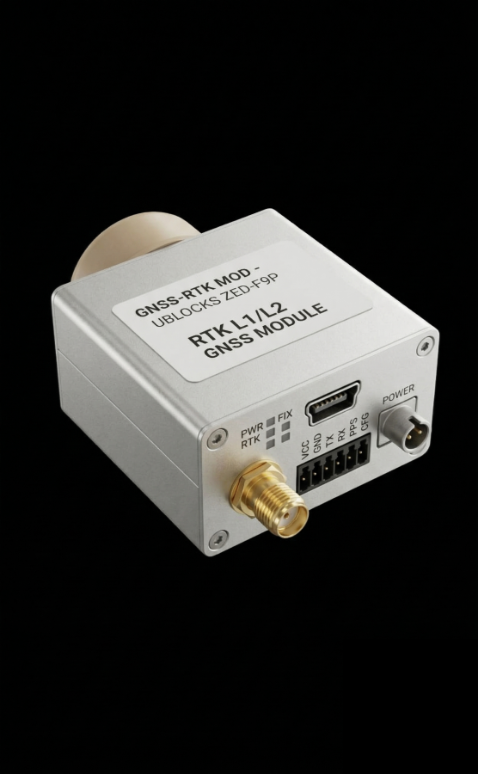
Procurement teams sometimes separate compliance screening from engineering questions. For thermal modules, that split creates avoidable rework. A USB prototype may be fast to evaluate, but a production device could require MIPI, DVP, a board-specific serial control path, or CVBS analog output on an applicable configuration. The MIPI CSI-2 specification page describes a sensor-to-processor protocol; ask CAMCUDA for the selected board’s output format, lane/timing requirements, and host support. A connector name alone does not settle these system-design choices.
Teledyne FLIR’s Gremsy Vio payload coverage concerns a separate finished payload for public safety and industrial applications. It shows why field missions shape integration decisions, but the CAMCUDA sample needs its own configuration and acceptance evidence. Thermal video must arrive where the operator, processor, recorder, or edge system can use it.
The safer RFQ is specific. Ask for the output mode, host platform, target display or recorder, expected control interface, lens/FOV requirement, power budget, enclosure plan, operating environment, and any documents needed for buyer review. If a buyer requests TAA-related documentation, NDAA-related statements, country-of-origin records, or internal vendor forms, list each requested document and the exact model/configuration, destination, and intended use. Ask which documents are available for that scope.
Useful support documents should be requested through the CAMCUDA downloads and support area or directly through the contact/RFQ page. Use the AeroMini datasheet for its illustrated 16-pin USB/CVBS and 26-pin MIPI/DVP references, and the AeroMini Linux drivers, examples, and SDK FAQ for the matching resource path. Confirm board revision, firmware, host/software version, output format, and frame rate before accepting an integration. The PDF contains electrical references, not a dimensioned assembly drawing; request CAD or a drawing for the ordered lens and board. The available 7 mm STEP reference does not establish the complete 9 mm assembly envelope.
The illustrated 16-pin guide labels RS232, while the 26-pin guide lists 3.3 V UART. Confirm electrical levels, connector orientation, and any required transceiver before wiring. POWER_IN1 and POWER_IN2 are 5 V inputs; do not apply 12 V. USB video does not establish USB serial or default RS422. Type-C + CVBS is a separate board configuration: request its matched guide rather than using these 16-pin or 26-pin diagrams.

Common mistakes in an OEM documentation RFQ
Mistake 1: treating TAA, NDAA, and internal compliance review as one checkbox
They are different buyer requirements. If the buyer needs a particular statement or document, name it. Ask which documents are available for the exact model, configuration, destination, and intended use, then have the buyer review whether that scope meets the request.
Mistake 2: asking for the document before naming the module
Documentation is tied to the product and configuration. Start with the exact model, lens, camera version, and interface board, then ask for documents attached to that configuration.
Mistake 3: forgetting the analog video path until the field team joins
Legacy displays, recorders, and drone transmission paths may still need analog video. When relevant, write “CVBS analog output on applicable configurations; confirm during RFQ.” Do not assume every configuration ships with every interface.
Mistake 4: letting the sample order define acceptance by accident
A sample can arrive quickly and still be hard to evaluate if the team did not specify lens/FOV, host board, power, mounting, temperature environment, and documentation needs. A slower first RFQ is often faster than a second sample cycle. Give target size and working distance, then use the thermal imaging calculator for preliminary scene-coverage and sampling estimates. Validate the selected lens and representative targets; geometry estimates do not establish inspection performance or temperature accuracy.
RFQ checklist for oem taa camera solutions
- Exact product model, SKU, camera version, lens, factory frame rate, and interface board.
- Application: UAV payload, outdoor monitoring, industrial inspection, robotics, embedded vision, or another use.
- Destination market and any buyer documentation requirements.
- Ask which configuration-specific NDAA-related documents are available if needed for buyer review.
- Video output required for prototype and production: USB, MIPI, DVP, CVBS, or mixed path; confirm format, rate, and output combination on the selected board.
- Control interface, connector, electrical levels, and serial commands; do not infer USB serial from USB video.
- Host platform, recorder, display, video transmitter, or edge processor.
- Lens/FOV, mechanical envelope, power budget, enclosure plan, and temperature environment.
- Sample acceptance criteria and expected support documents.
Build the RFQ around a real module
For a concrete starting point, review the AeroMini 640 with the selected 9 mm lens and interface board, then send CAMCUDA the application, interface, documentation, and procurement questions in one RFQ. If the project touches UAV inspection or outdoor monitoring, include those deployment notes at the beginning instead of after the sample arrives.
FAQ about OEM thermal camera documentation RFQs
What does oem taa camera solutions mean in a real RFQ?
It usually means the buyer wants both an OEM camera/module path and procurement documentation clarity. Treat it as a request for exact product, documentation, country or market review, and integration details.
Does CAMCUDA claim every module is TAA compliant?
No. This article makes no product TAA-compliance claim. Ask for the exact documentation required for the chosen model, configuration, destination market, and intended use, and have the buyer review its scope.
Can CAMCUDA provide an NDAA statement?
Ask which model- and configuration-specific NDAA-related documents are available for buyer review. State the destination, intended use, and requested document scope during RFQ; availability and suitability need confirmation.
Why mention CVBS in a procurement article?
Because legacy displays, recorders, analog video transmitters, and some drone payload workflows still ask for analog video. Use careful wording: CVBS analog output on applicable configurations, confirm during RFQ.
Is USB enough for an OEM thermal payload prototype?
USB can be a practical prototype video path, and the selected AeroMini USB + CVBS + MIPI kit includes USB video. Confirm the host, firmware, format, and output rate. USB video does not establish USB serial control. Production may need a different interface plan, so state the prototype and production path separately.
Which exact CAMCUDA configuration should the buyer review?
Review AeroMini 640 with the 9 mm lens, non-radiometric imaging version, and USB + CVBS + MIPI board. Specify 60 Hz factory default or the 30 Hz factory option. The SKU AEROMINI-640-9MM does not replace the camera-version and board selections. The current sample kit includes the module and lens, the selected tailboard, and a USB cable requiring customer soldering; confirm the quotation. This version does not measure temperature.
Should the RFQ include field conditions?
Yes. Outdoor monitoring, UAV inspection, and industrial sites change enclosure, vibration, temperature, lens/FOV, and mounting requirements.
What should a buyer avoid saying?
Avoid vague requests like “send a TAA camera.” Instead, name the module, application, required documents, interface path, destination market, and sample acceptance criteria.
Where should buyers request drawings and support files?
Use the CAMCUDA support/downloads area, the AeroMini datasheet, and the AeroMini SDK FAQ for available materials. Use the contact/RFQ page to request drawings for the ordered lens and board, matching interface references, and the documents the buyer needs to review.
Technical author: Daniel · Hardware Support
Sales contributors: Vivian, Lena and Sophie.