cheap thermal camera core: 4 budget traps before the sample order
Procurement teardown
cheap thermal camera core: 4 budget traps before the sample order
A buyer finds a cheap thermal camera core, forwards the link to engineering, and asks whether the sample can ship this week. The price looks harmless. The expensive part starts later, when the lens is wrong, the host board cannot read the interface, or the quote lacks the documents procurement needs before a pilot build.
Quick answer
A cheap thermal camera core is useful when the low price still matches the interface, power budget, lens/FOV, host-board plan, documentation, and final use case. CAMCUDA’s current Featured products include AeroMini 640, the primary configurable 640 × 512 option reviewed here, and SuperMini 640 / 640T, a compact-core comparison at the same resolution. Their integration requirements differ; request configuration-specific pricing and compare the complete kit and host work. Lower-resolution sensing may still fit a simpler application. Do not compare only unit price; compare the cost of getting a working sample into a real product.
Why a cheap thermal camera core can become expensive after delivery
The cheapest sample rarely fails in the spreadsheet. It fails on the bench. A low-cost LWIR core arrives, the mechanical team sees that the connector points the wrong way, the embedded engineer discovers the output path was assumed rather than confirmed, and procurement learns that the sample quote does not include the drawing, interface notes, or compliance statement required for the next approval gate.
That is why the first sample order should be treated as an integration test, not only a price test. The buyer is not just buying pixels. They are buying a detector path, optical path, board interface, power behavior, documentation package, and supplier response pattern.
Search results make the problem harder because low headline prices are easy to remember. Seek Thermal’s low-cost thermal core offer, for example, is a real example of how price anchors buyer expectations. It can be useful market context, but an OEM buyer still needs to ask what resolution, frame rate, output path, quantity, lens, host support, and software expectations sit behind that number.
The same systems view appears in Micron’s computer vision overview: an imaging device depends on capture, processing, data flow, and interpretation. A cheap thermal camera core is only one part of that chain. If the host board, firmware, and procurement package are not ready, the low unit price becomes a board-spin cost.
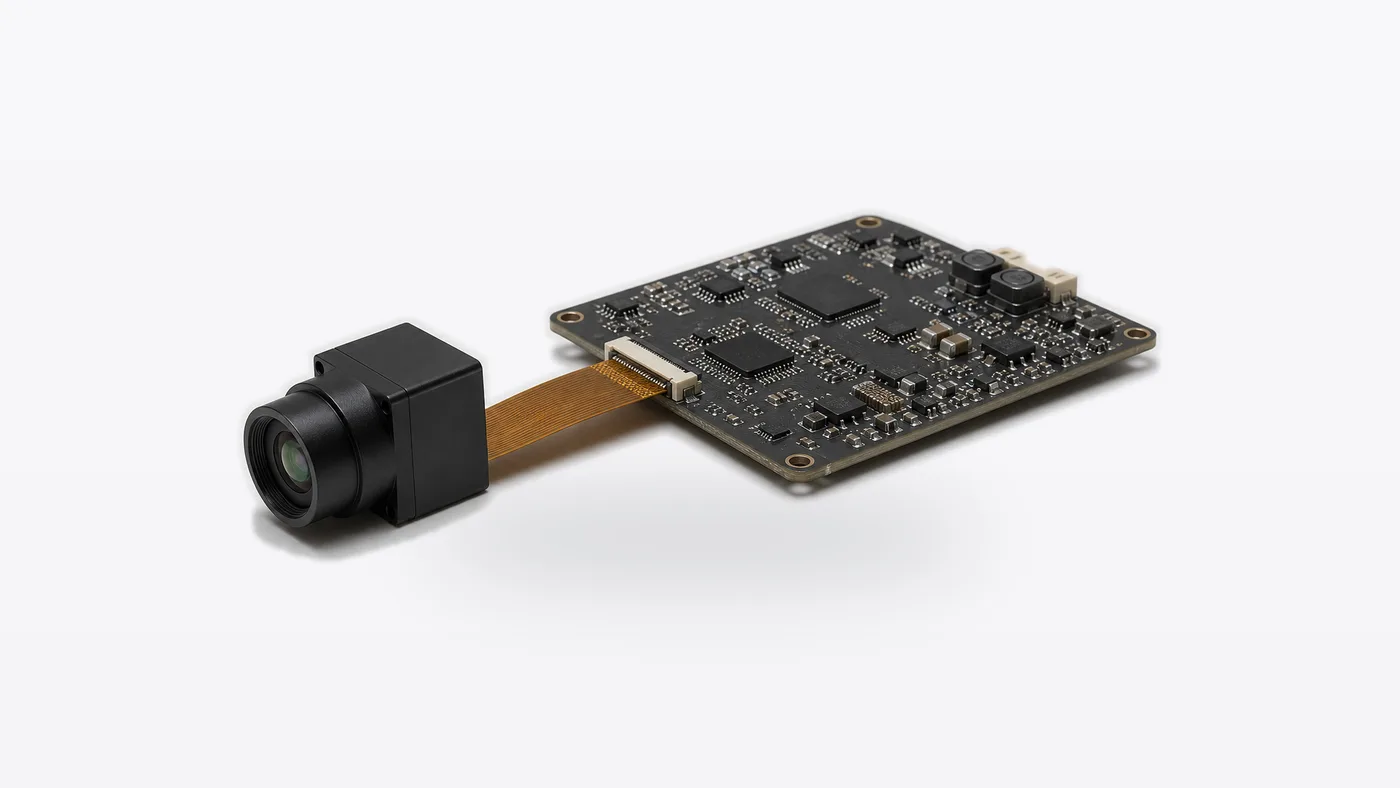
cheap thermal camera core selection chart: 4 budget traps to check first
| Budget trap | What looks cheap | What can become expensive | What to confirm before sample order |
|---|---|---|---|
| Interface mismatch | The sample has the lowest listed price. | Host-board redesign, bridge board, custom firmware, or delayed bring-up. | SPI, USB, MIPI, DVP, RS-422, or CVBS analog output on applicable configurations. |
| Optics mismatch | The detector resolution looks acceptable. | Wrong FOV, unusable working distance, enclosure window conflict, or poor target coverage. | FOV, lens path, target size, distance, enclosure opening, and final optical drawing. |
| Documentation gap | The supplier can ship a sample quickly. | Procurement, compliance, or customer approval stalls after the demo. | Datasheet, mechanical drawing, interface notes, CE/RoHS review where applicable, and NDAA statement availability when relevant. |
| Application drift | A general thermal module is treated as good enough. | The product team later needs outdoor, drone, industrial, or live-monitoring behavior the sample was not chosen for. | Use case, environment, power budget, frame-rate need, host processor, and product roadmap. |
This is the uncomfortable part of a cheap thermal camera core RFQ: a lower quote is not wrong, but it needs a tighter question. A buyer can choose a low-cost module on purpose. The mistake is choosing it before the application has been named.
Featured product fit: when low cost is valid and integration requirements differ
CAMCUDA’s current Featured products offer two integration paths at 640 × 512. Start with AeroMini 640 for a configurable module and interface-kit review. Compare SuperMini 640 and SuperMini 640T when bare-core size and weight are central to the design, with imaging-only and thermographic versions to distinguish. Neither model is identified here as the cheapest option. Compare current quotations for the selected lens, board, cable, software support and quantity, then add host-design work to the total project cost.
That difference matters because “cheap” is not a product category. A smart appliance, HVAC sensing node, compact security sensor, and industrial IoT device may be well served by a smaller thermal input. A drone payload, utility inspection camera, or outdoor observation platform may need a higher-resolution module even if the first sample costs more. DJI’s thermal drone basics is a useful reminder that thermal payload decisions involve use case, captured data, field handling, and sensor protection, not only sensor availability.
| Product model | AeroMini 640 |
|---|---|
| Price and kit scope | Confirm the current price for the selected camera version, lens, interface package and quantity; include cables and host-integration work in the comparison. |
| Detector | Uncooled VOx LWIR detector |
| Resolution | 640 × 512 |
| Pixel pitch | 12 μm |
| Spectral range | 8–14 μm |
| Non-radiometric frame rate | 60 Hz default; 30 Hz factory option selected when ordering |
| Radiometric configuration | 25 Hz; availability enquiry only. Confirm the lens, interface, data format and measurement requirements separately. |
| NETD | ≤30 mK at 25 °C, F/1.0 |
| Power | <0.5 W typical module consumption at 25 °C; complete-kit consumption may differ. |
| Supply and illustrated pins | Board-dependent family supply: 5 V or 12 V. The illustrated POWER_IN1 and POWER_IN2 inputs accept 5 V only; do not apply 12 V to those pins. |
| Interface packages | Non-radiometric: USB + CVBS + MIPI, Type-C + CVBS, or both tailboards. Match the board, firmware, output format and rate to the host. |
| Control and analog video | UART, RS232, RS422 and CVBS availability depends on the selected interface board; confirm the quoted configuration. |
| Weight and dimensions | <20 g; 21 × 21 × 28 mm, excluding lens and flange. Confirm the complete assembly envelope. |
| Operating temperature | −40 °C to +80 °C |
| Product models | SuperMini 640: imaging only; SuperMini 640T: thermographic |
|---|---|
| Price and kit scope | Configuration-specific quotation: confirm the model, lens, expansion board, supplied items and quantity before comparing final kit cost. |
| Detector | Uncooled VOx LWIR detector |
| Resolution | 640 × 512 |
| Pixel pitch and spectral range | 8 μm; 8–14 μm |
| Frame rate | SuperMini 640: 50 Hz imaging; SuperMini 640T: 30 Hz thermography |
| NETD | ≤40 mK at 25 °C, F1.0 |
| Typical core power | ≤0.5 W at 25 °C, excluding the expansion board |
| Bare-core supplies | MAIN_POWER: 3.8–5.2 V, typically 5 V; +3.3 V rail: 3.28–3.32 V; +1.8 V rail: 1.78–1.82 V. All three rails and the manual’s sequencing and noise limits require review. |
| Core connector and control | 30-pin Hirose DF40C-30DP-0.4V(51); UART uses 1.8 V logic, with TX/RX referenced to the core. |
| Digital video | 8-bit LVCMOS and 2-lane MIPI; BT656 for SuperMini 640, CDS3 for SuperMini 640T. BT656 and MIPI cannot operate simultaneously. |
| USB and analog video | USB 2.0 and CVBS pins are documented; CVBS requires an external video-buffer IC. Confirm any optional expansion board separately. |
| Bare-core weight and dimensions | <3.5 g; 13 × 13 × 13.4 mm, excluding optics and boards. These are not complete-camera dimensions or weight. |
| Operating temperature | −40 °C to +70 °C; thermography: −20 °C to +60 °C |

Application case: the budget sample that still needed a better RFQ
A hardware startup wants a small thermal input for an HVAC airflow accessory. The founder searches for a cheap thermal camera core and sees several possible paths. The first purchase instinct is simple: order the least expensive module and let firmware evaluate it. The engineer pauses because the product is battery-powered, has a tight plastic enclosure, and only has one board spin left before the pilot build.
For that product, a lower-resolution sensing module may be appropriate if its power, host interface and lens/FOV meet the task. The current Featured 640 × 512 options should earn their place in the same comparison: review AeroMini 640’s selected interface kit, or SuperMini 640 / 640T’s bare-core footprint and additional power and host requirements. A small core does not establish low complete-system power or a lower final kit cost. Ask for connector orientation, timing expectations, lens/FOV confirmation, sample availability and documentation before the purchase order. Cheap works only when the sample answers the right question.
Now change the scene. A utility inspection integrator wants a thermal module for a compact payload that may be used from a drone and sometimes on a tripod at outdoor substations. The buyer still wants low price, but the application points toward resolution, video path, mechanical size, and procurement documents. In that case the team should review drone thermal camera application constraints and the outdoor field thermal imaging application path before treating a low-cost core as equivalent.
For North America procurement, the RFQ should also ask for available product specifications, drawings, interface references, CE/RoHS-related review where applicable, and NDAA statement available on request. That wording is more useful than asking whether the supplier has the “cheapest core” because it tells CAMCUDA what approval gate the buyer is trying to pass.


Interface and documentation decide whether the cheap thermal camera core is usable
The interface question should be written in the first RFQ email. For a compact embedded device, SPI may be the correct path. For quick desktop evaluation or higher-resolution OEM video, USB can reduce early friction. For control communication, RS-422 may matter. For retrofits, legacy displays, low-latency monitoring, or analog video transmission, CVBS analog output on applicable configurations may be worth confirming during RFQ. MIPI and DVP belong in a different host-board conversation.
Do not let a supplier answer with “yes, supported” if the host system is already defined. Ask for the exact output path, connector route, evaluation board, frame-rate expectations, host operating environment, and whether the interface is standard on the quoted configuration or requires a specific project option.
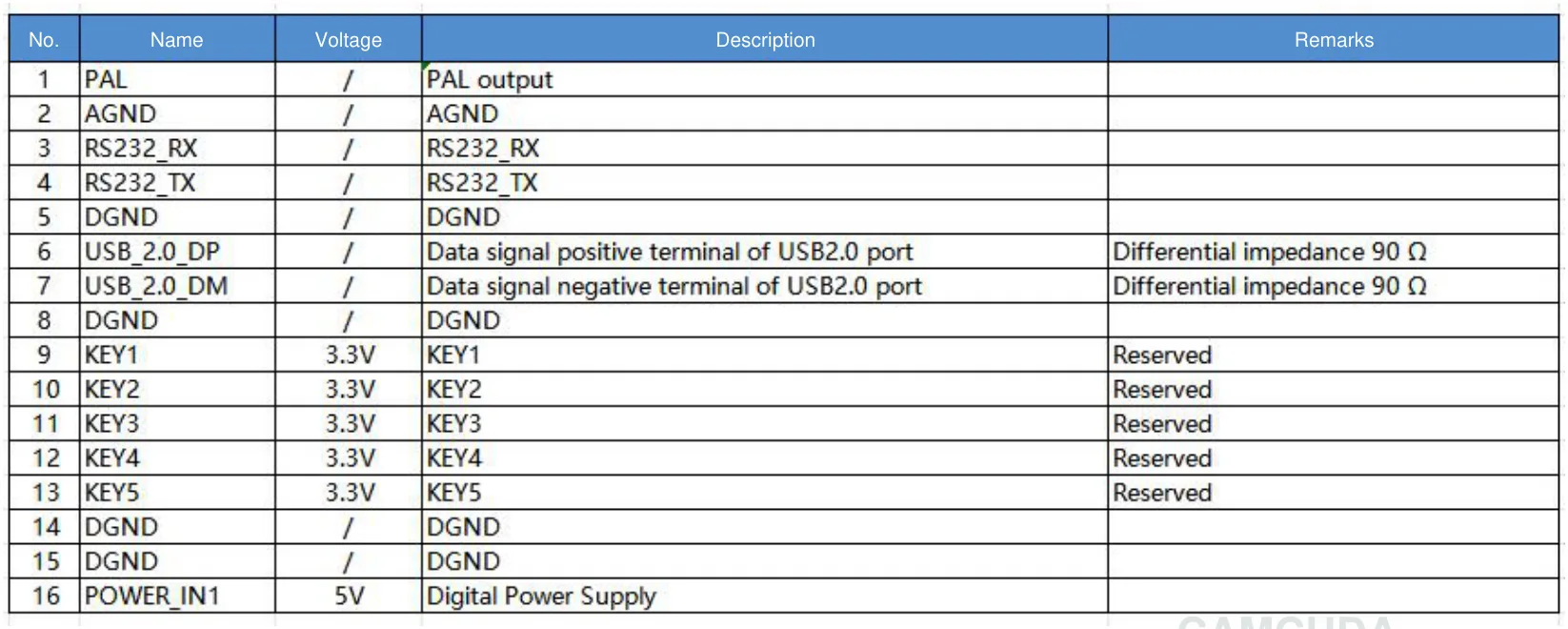
For AeroMini 640, the 16-pin USB/CVBS reference on PDF page 3 and 26-pin MIPI/DVP reference on PDF page 4 apply to their illustrated board, not the Type-C board. POWER_IN1 and POWER_IN2 are 5 V inputs only, even though the family specification lists board-dependent 5 V or 12 V supply options. For SuperMini 640 / 640T, use its own 30-pin core-interface definition on PDF pages 6–7 and power requirements on PDF page 8. Include all three core rails, 1.8 V UART logic and the external CVBS video buffer in the integration review.
Software belongs in the same budget. AeroMini 640’s official SDK FAQ links to a public documentation folder with manuals, USB Client Software.zip and USB-SDK.zip. The FAQ describes USB-SDK.zip as Linux drivers, examples and SDK resources. These are AeroMini documentation links, not tested compatibility results or SuperMini software. Confirm the selected board, firmware, host, image format and frame rate before budgeting software integration.
Good internal navigation should also help the buyer continue the work. Google’s SEO starter guide explains that links should guide users to relevant pages. For this buyer, useful next steps are thermal imaging cores, thermal modules, uncooled thermal modules, support downloads, and the CAMCUDA RFQ page.
Common mistakes when sourcing a cheap thermal camera core
- Buying pixels instead of a product path. Resolution matters, but the host interface, lens/FOV, power, and enclosure decide whether the sample can become a product.
- Ignoring the connector until the PCB layout meeting. A low-cost module can become expensive if FPC pitch, orientation, or cable routing forces a board change.
- Using drone requirements for an embedded sensor. A small HVAC or appliance sensor does not need the same video path as a UAV payload, and the reverse is also true.
- Assuming CVBS is included by default. CAMCUDA can support CVBS analog output on applicable configurations, but buyers should confirm during RFQ for the exact model and project.
- Forgetting procurement documents. A demo can look successful while the pilot order is blocked by missing drawings, interface references, compliance review, or NDAA statement request.
RFQ checklist before ordering a cheap thermal camera core sample
| RFQ field | What to send CAMCUDA |
|---|---|
| Application | Smart appliance, HVAC sensing, embedded security, IoT device, drone payload, outdoor field monitoring, industrial inspection, or another OEM use. |
| Preferred product path | AeroMini 640 for a configurable module/interface-kit review; SuperMini 640 or SuperMini 640T for compact-core integration; or a lower-resolution alternative if the sensing task does not require 640 × 512. |
| Interface | Required output and control path, exact board and connector, host processor and operating system, image format and rate, evaluation cable, and model-specific SDK or host support. Confirm whether CVBS needs extra circuitry. |
| Optics | Working distance, target size, FOV, lens window, enclosure space, and whether the optical path is final or still flexible. Use the thermal imaging calculator for preliminary planning, then confirm the selected lens and application geometry. |
| Mechanical limits | Available board area, height, cable exit, connector orientation, vibration expectation, weight target, and enclosure constraints. |
| Power and thermal environment | Supply voltage, power budget, operating temperature, duty cycle, startup behavior, and whether the product is battery-powered. |
| Documents | Datasheet, mechanical drawing, interface reference, test sample terms, CE/RoHS/ISO-related review where applicable, and NDAA statement available on request. |
Before sending the RFQ, check the support FAQ for common process questions and use contact/RFQ for project-specific confirmation.
Make the low-cost sample prove the right thing
If you are searching for a cheap thermal camera core, send CAMCUDA the use case, host interface, optics, enclosure limits, and document requirements before comparing samples. Review AeroMini 640 as the primary current Featured option and SuperMini 640 / 640T as the compact-core comparison when 640 × 512 is justified. If a lower-resolution module meets the task, include that alternative in the RFQ. Compare current configuration-specific quotations and the work needed to reach a usable sample.
Review AeroMini 640 | Compare SuperMini 640 / 640T | Request engineering RFQ
FAQ: cheap thermal camera core buyer questions
What is a cheap thermal camera core good for?
A cheap thermal camera core can be good for compact embedded sensing, smart devices, HVAC monitoring, IoT sensing, and early OEM prototypes when the interface, optics, power, and documentation match the product plan.
Is the lowest-priced thermal core always the best sample?
No. The best sample is the one that answers the next engineering risk. A lower-resolution module may be appropriate for a simple sensing task. If the product needs 640 × 512 video or a particular host interface, compare the complete configuration, supporting circuitry, software work and enclosure fit rather than assuming the lowest unit price gives the lowest project cost.
Which current CAMCUDA Featured product should I review first?
Start with AeroMini 640 for the configurable 640 × 512 module and interface-kit review used in this article. It has 12 μm pixels, a 60 Hz non-radiometric default and a 30 Hz factory option. The 25 Hz radiometric version requires an availability enquiry. Request the current price and supplied items for your selected configuration; Featured status does not establish the lowest price.
When should I compare SuperMini 640 or SuperMini 640T?
Compare SuperMini 640 / 640T when a 640 × 512 design has tight bare-core size and weight limits. The published 13 × 13 × 13.4 mm and <3.5 g figures exclude optics and boards. SuperMini 640 is imaging-only at 50 Hz; SuperMini 640T provides thermography at 30 Hz. Budget for the selected lens, board, three core power rails and model-specific host integration.
Can a cheap thermal camera core support CVBS analog video?
CVBS depends on the module family and configuration. For AeroMini 640, confirm the selected tailboard and output mode. SuperMini 640 / 640T documents a CVBS pin that requires an external video-buffer IC; it is not a ready-to-drive analog output by itself. Confirm the complete analog path and any extra board or circuitry during RFQ.
What hidden cost should procurement check first?
Check whether the quote includes or can support the documents needed for the next approval gate: datasheet, mechanical drawing, interface reference, compliance-related review where applicable, and NDAA statement available on request for relevant North America or government-adjacent procurement.
Does low resolution mean poor value?
Not always. Lower resolution can be appropriate for presence sensing, compact heat-pattern detection, battery-powered devices, and narrow-FOV embedded products. It is poor value only when the application actually needs more detail, video output, or longer working distance.
What should I include in the first email?
Include intended application, target quantity, host processor, interface preference, lens/FOV needs, enclosure limits, power budget, operating environment, documentation requirements, and whether the sample is for a prototype, pilot build, or production quote.
Can CAMCUDA help choose between AeroMini 640 and SuperMini 640 / 640T?
Yes. Send the application, required imaging or thermographic function, lens/FOV, host interface, power budget, enclosure limits and quantity. Both product families use 640 × 512 detectors, so compare their integration requirements and configuration-specific quotations. Ask for a lower-resolution alternative as well if the sensing task does not require this level of detail.