Thermal Camera Suppliers: 9 Critical Checks for Reliable OEM RFQ
thermal camera suppliers are easy to compare badly. Many buyers still sort vendor lists by price, country, or a single sensor headline, then discover too late that documentation is weak, interfaces are vague, and the RFQ response does not match the real deployment. This guide explains how to compare thermal camera suppliers using live CAMCUDA product facts and a practical B2B sourcing checklist.
Technical author: Daniel · Hardware Support
Sales contributors: Vivian, Lena and Sophie.
Quick answer
The best thermal camera suppliers are the ones that answer your application, interface, documentation, and compliance questions clearly enough to reduce engineering risk. A shorter quote is not a better quote if the supplier cannot support lens choice, host integration, procurement documents, or realistic configuration review.
Thermal camera suppliers comparison chart
Buyers comparing thermal camera suppliers often start with marketplaces, brand pages, and broad catalogs. What is often missing is a sourcing framework for engineers and procurement managers who must shortlist a supplier for an actual module or handheld program.
| Decision area | What to compare | CAMCUDA-backed example | Why it matters |
|---|---|---|---|
| Product truth layer | Live product pages with named configurations, matched images, and real parameters | CAMCUDA AeroMini 640 and SuperMini 640 have current product pages with configuration-specific public data | A supplier without clear product pages makes early comparison slow and error-prone. |
| Interface honesty | Named video and control interfaces plus what still needs confirmation | AeroMini offers distinct USB + CVBS + MIPI and Type-C + CVBS boards; SuperMini core integration uses its own 30-pin manual | Thermal camera suppliers should show enough interface detail to start integration review without guessing. |
| Documentation support | Drawings, interface notes, compliance packets, RFQ responsiveness | The AeroMini datasheet supplies board-specific pin tables; the SuperMini manual includes core-interface and mechanical references | A thermal supplier decision is often won by documentation speed, not only unit price. |
| Configuration clarity | Lens options, power windows, mass, environment limits | AeroMini lists a 21 × 21 × 28 mm module reference excluding lens/flange; SuperMini lists a 13 × 13 × 13.4 mm bare core excluding lens/expansion board | Thermal camera suppliers need to prove configuration range, not just list one generic image. |
| Compliance support | Destination-market requirements and configuration-specific NDAA-related, CE or RoHS documents where applicable | Ask which documents are available for the exact configuration, destination and intended use; the buyer reviews their scope and relevance | This reduces procurement friction for North America and Europe buyers. |
| After-selection path | Contact, downloads, support, and application pages | CAMCUDA links product pages to applications, support, downloads, and RFQ contact | Strong sourcing journeys lower the time between shortlist and sample evaluation. |
What current CAMCUDA pages show when thermal camera suppliers are compared by evidence
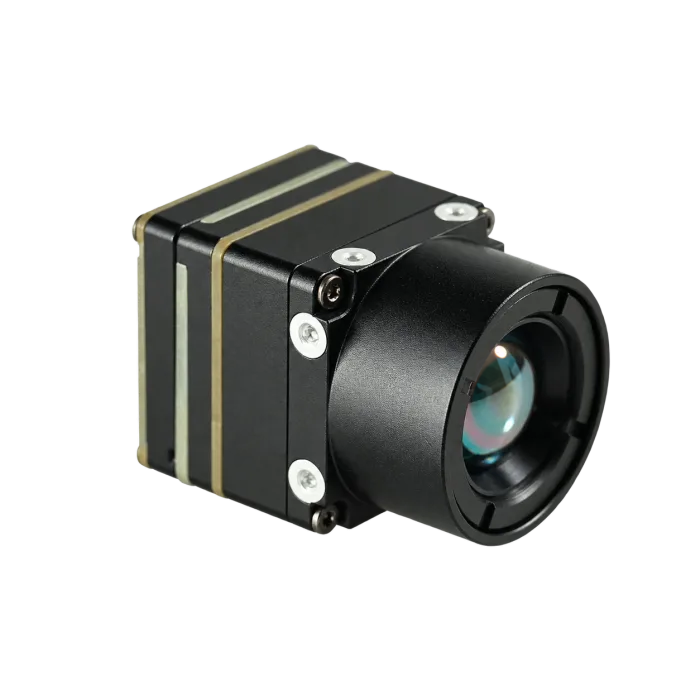
The current AeroMini 640 page gives a useful supplier-evidence baseline: a named module, configuration choices, module imagery, and 640×512 resolution with 12 μm pixels. The non-radiometric version is imaging-only, with a 60 Hz factory default or 30 Hz factory configuration. Its NETD is ≤30 mK at 25 °C, F1.0; the 21 × 21 × 28 mm and <20 g module references exclude the lens and flange. Typical module power is <0.5 W at 25 °C, so budget the selected board and complete assembly separately. The product FAQ links Linux drivers, examples and SDK resources; confirm the package for the selected board, firmware and host before evaluation.

The SuperMini 640 page expands that proof set with a different integration path: a 640×512 imaging-only core at 50 Hz, 8 μm pixels and NETD ≤40 mK at 25 °C, F1.0. Its <3.5 g and 13 × 13 × 13.4 mm references apply to the bare core without lens or expansion board. The core requires a 3.8–5.2 V main supply plus the specified 3.3 V and 1.8 V rails, with 1.8 V UART control; it is not a USB plug-and-play kit. That matters because thermal camera suppliers are not equal if one vendor can only explain the detector while another can explain the downstream video architecture.

The AeroMini connector reference adds another supplier signal: whether the documentation actually matches the selected board. A product photograph, bare-core drawing and electrical schematic answer different questions. These 640×512 examples do not establish suitability for a 1280×1024 requirement or a finished handheld system. Keep those needs explicit in the RFQ and request evidence for the complete proposed configuration, as shown below.
| Sourcing path | Evidence to compare or request | What that says about supplier fit |
|---|---|---|
| Compact 640×512 evaluation | AeroMini 640: imaging-only 60 Hz default or 30 Hz factory option, with board-specific kit choices. SuperMini 640: imaging-only 50 Hz bare-core path with separate integration requirements. | Compare a selected module kit with a bare-core design using the complete lens, board, power and host requirements. |
| 1280×1024 requirement | Request a current native-resolution specification, matched lens/FOV, output format, frame rate, host bandwidth and complete assembly power and dimensions. | Useful when higher detail and broader host-interface planning matter more than minimum size; the 640×512 examples above do not meet a native 1280×1024 requirement. |
| Finished handheld system | Request evidence for the complete device: display, battery runtime, controls, recording, optics, environmental limits and ready-to-use mass. | Useful when the supplier must support finished-device field workflows as well as modules; a bare core or module kit alone does not establish those capabilities. |
A realistic OEM sourcing case for thermal camera suppliers
Consider a drone inspection integrator planning a commercial program for utility and outdoor asset review. The first sourcing mistake is to ask all thermal camera suppliers for “a 640 thermal module price” with no platform context. That makes every answer shallow. A stronger sourcing approach is to state target distance, payload weight ceiling, preferred output path, recorder or transmitter requirement, quantity band, destination market, and expected documentation package.
With that context, a supplier can clarify whether an AeroMini module kit or a SuperMini bare-core integration fits a 640×512 imaging task, whether a native 1280×1024 requirement is justified, whether a legacy display chain needs analog help, and what must still be confirmed during RFQ. If the inspection needs temperature measurement, specify that separately; the imaging-only examples here do not provide it. Thermal camera suppliers that answer in those terms are usually more useful than thermal camera suppliers that only forward a price list.
Interface and compliance review when comparing thermal camera suppliers
Interface clarity is one of the fastest ways to separate strong thermal camera suppliers from weak ones. AeroMini’s USB + CVBS + MIPI board and Type-C + CVBS board are distinct configurations. The illustrated 16-pin USB/CVBS connector uses RS232 control; the separate 26-pin MIPI/DVP connector uses 3.3 V UART. Their POWER_IN1 and POWER_IN2 inputs are 5 V only: do not apply 12 V or treat either diagram as a Type-C pinout. Match control-signal levels and the supplied board guide before wiring. SuperMini has a different 30-pin core interface; its CVBS path requires the external buffer described in the manual. If your workflow involves analog video, legacy recorders, drone video transmission, low-latency monitoring, OEM retrofits, or embedded systems, ask whether CVBS analog output on the proposed configuration is possible and confirm during RFQ.
Compliance language is another filter. Ask which NDAA-related documents are available for the exact configuration, destination and intended use, and have the buyer review their scope and relevance. That matters for North America security monitoring, industrial monitoring, and government-adjacent review, where thermal camera suppliers are often screened on paperwork before sample approval.
External references such as the ISO 9000 family overview are useful here because they remind buyers to ask about quality-system discipline and documentation practice, not only the camera body itself. This is general background, not evidence that CAMCUDA or a product holds a particular certification; request and review any relevant certificate and its scope.
How to run a first sample round with thermal camera suppliers
Once thermal camera suppliers are shortlisted, buyers should not treat the first sample order as a casual experiment. Define what success looks like before the sample ships: target scene, host interface, acceptable image latency, power stability, documentation completeness, and how quickly the supplier responds to integration questions. A supplier that sends hardware quickly but cannot answer basic interface questions is still creating schedule risk.
Across product families, the first sample round can also test whether the supplier understands when to recommend a compact module kit, when a higher-resolution interface-heavy module is required, and when a complete handheld system would solve the operator problem faster. That type of recommendation quality is one of the clearest differentiators among thermal camera suppliers.
Common thermal camera suppliers mistakes
- Comparing thermal camera suppliers only by unit price.
- Failing to give application context in the first RFQ.
- Assuming any listed interface is standard on every configuration.
- Ignoring lens and host-side integration requirements.
- Leaving compliance and NDAA questions until procurement is already blocked.
- Skipping support and documentation response tests before sample order.
RFQ checklist for thermal camera suppliers
- Describe the product type: module, core, handheld, payload subsystem, or finished observation device.
- State the application clearly: drone inspection, industrial monitoring, OEM embedded device, security monitoring, or outdoor field review.
- List resolution target, lens preference, payload or enclosure limits, and power range. Use the thermal imaging calculator for preliminary target-size, distance and lens comparisons, then validate the actual target and scene.
- Name required output paths and whether legacy displays, recorders, or low-latency transmitters are involved.
- Ask which facts are standard and which require confirmation during RFQ.
- Request drawings, interface references, pricing basis, lead-time logic, and destination-market document availability.
- Ask which NDAA-related documents are available for the exact configuration, destination and intended use when the procurement path requires them; have the buyer review their scope and relevance.
- Cross-check product pages, application pages, downloads, and contact before selecting among thermal camera suppliers.
Another practical filter is how a supplier handles unknowns. Strong thermal camera suppliers clearly label what is public, what is configurable, and what still needs RFQ confirmation. Weak suppliers blur those boundaries, which creates avoidable procurement risk later.
Shortlist thermal camera suppliers with a better RFQ
Use the current AeroMini 640 and SuperMini 640 pages for the compact 640×512 comparison. Keep higher-resolution and finished handheld requirements explicit, then send CAMCUDA a focused RFQ through the contact page with interface, lens, compliance, and quantity details.
Documents serious buyers should request from thermal camera suppliers
Serious buyers should ask thermal camera suppliers for more than a brochure. A practical document pack usually includes the latest datasheet, mechanical drawing or size confirmation, interface description, lens or FOV options, compliance note, quotation assumptions, and any destination-market caveats. AeroMini’s public datasheet does not include a dimensioned complete-assembly drawing, so request CAD matched to the selected lens and board; the SuperMini drawing above covers only the SuperMini bare core. If the project is moving toward North America industrial monitoring or security review, the buyer should also ask which NDAA-related documents are available for the shortlisted configuration, destination and intended use, then review their scope and relevance.
Requesting these items early is not bureaucracy. It is how procurement teams discover whether a supplier can support the real decision path instead of only presenting marketing collateral. Strong thermal camera suppliers tend to answer this request in a structured way, which is itself a useful buying signal.
FAQ from buyers comparing thermal camera suppliers
What should I compare first among thermal camera suppliers?
Compare product truth, interface clarity, documentation quality, and responsiveness to a real application-specific RFQ.
Why are product pages important when comparing thermal camera suppliers?
They show whether the supplier can present real product names, images, and parameters instead of generic catalog promises.
Should I ask for CVBS during supplier evaluation?
Yes when the project touches legacy displays, recorders, drone video transmission, or low-latency monitoring. Confirm the proposed board, signal level, wiring and any required external buffer during RFQ; a CVBS label alone does not establish compatibility.
When does NDAA wording matter?
It matters early when the procurement path has an applicable NDAA-related requirement. Ask which documents are available for the exact configuration, destination and intended use, and have the buyer review their scope and relevance.
How do I test a supplier before placing a sample order?
Send a clear RFQ and see whether the response resolves lens, interface, configuration, documentation, and destination-market questions without vague language.
Are marketplaces enough for sourcing?
Marketplace listings can help discovery, but serious buyers still need direct product-page facts and supplier-specific documentation support.
What do community questions usually emphasize?
The linked discussion asks about alternatives to FLIR and raises the distinction between a camera brand and the manufacturer of its thermal core. Use that distinction to ask who supplies the core, who integrates the camera and who supports the delivered configuration.
What is the practical next step after reading this guide?
Choose the best-fit product family, assemble your interface and compliance requirements, and send a disciplined RFQ to the supplier.
The camera-brand versus core-manufacturer distinction above is illustrated by this Reddit discussion about thermal camera brands. It is an anecdotal buyer discussion, not verified supplier or product evidence.