uav thermal camera: the acceptance memo after the demo flight
Procurement note for UAV payload teams
uav thermal camera: the acceptance memo after the demo flight
Consider this illustrative demo scenario, not a reported customer result: the operator sees a clean thermal image, the payload appears to stay within the aircraft envelope, and the facilities manager points to two areas worth checking on the tablet. Then procurement asks a quieter question: what exactly are we approving for the sample reorder?
That is where a uav thermal camera decision often becomes risky. A good flight proves that something worked once. It does not prove that the module, lens, video path, evidence capture, documentation, and field handoff are ready for a repeatable buying decision.
Quick answer
A uav thermal camera demo should end with an acceptance memo, not just a saved image. Before reordering samples, record the target condition, payload mass and power limits, lens/FOV assumption, operator display, saved evidence path, control interface, documentation needs, and what must be confirmed during RFQ. For CAMCUDA buyers, the current Featured AeroMini 640 provides a concrete evaluation configuration: non-radiometric imaging, 9 mm lens, USB + CVBS + MIPI kit, and 60 Hz factory default or a 30 Hz factory option. It does not measure temperature. The finished UAV payload still needs assembly, host, enclosure and procurement acceptance.
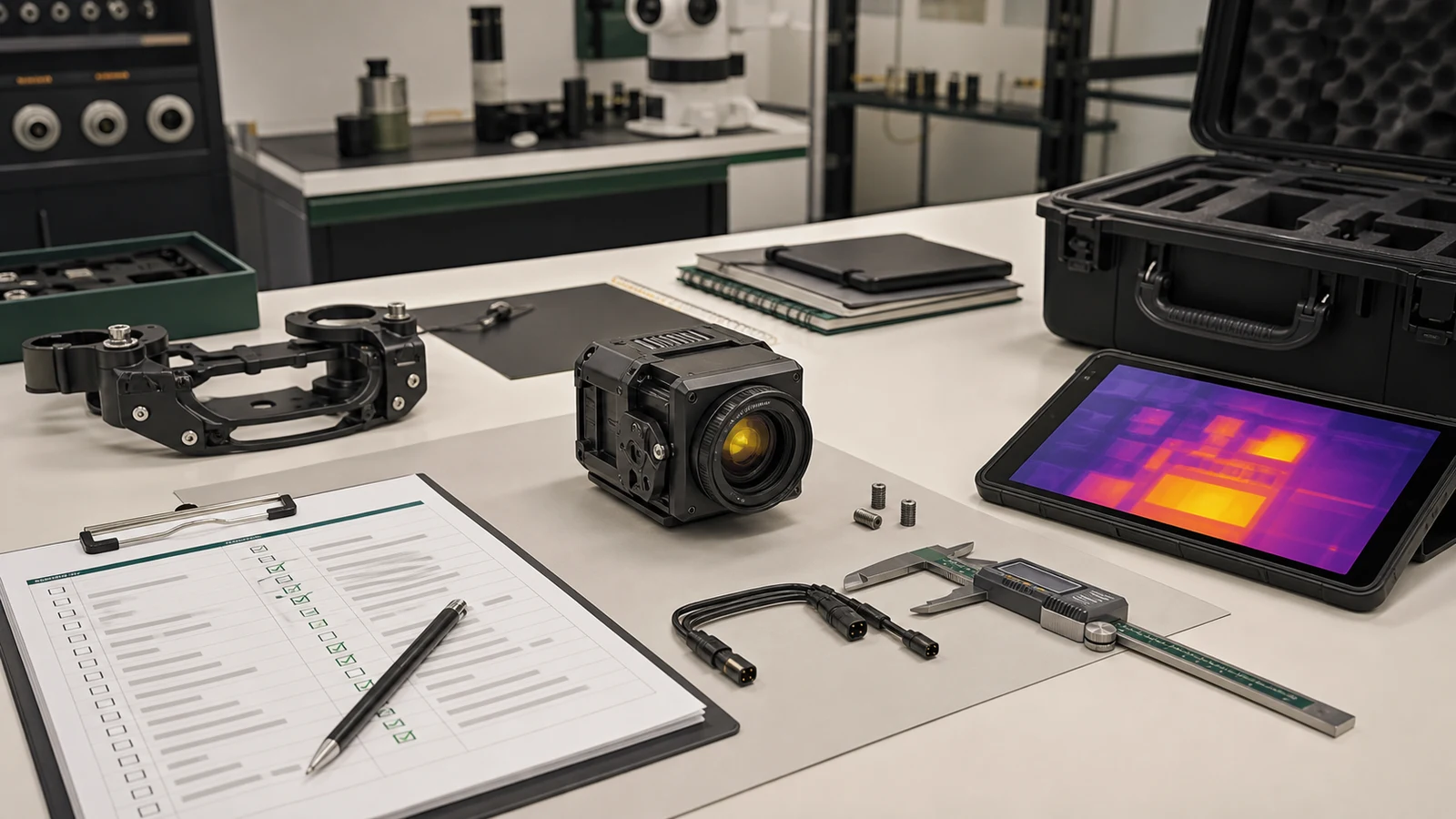
uav thermal camera acceptance chart after a successful demo
Use the chart while the demo is still fresh. It turns the field impression into questions engineering and procurement can both answer.
| Acceptance item | What to record | Why it matters before reorder | RFQ wording |
|---|---|---|---|
| Thermal evidence | Target, comparison area, distance, angle, time and asset ID; distinguish imaging from any temperature-measurement requirement | Prevents approval based on one dramatic palette image | Ask for lens/FOV review against target size and working distance |
| Payload fit | Mass margin, power rail, enclosure space, cable bend, and mount | A module that fits the bench may still crowd the aircraft | Share complete assembly envelope, selected 5 V input/current limits, startup demand and vibration assumptions |
| Video path | Operator display, host capture, recording location, and control path | Live view and saved evidence are not always the same system | Name the selected USB/CVBS/MIPI board, host capture and matched control interface |
| Field handoff | Who reviews the file, who verifies the asset, and what triggers action | Inspection value appears after landing, not during the best-looking frame | Describe the workflow from flight to maintenance or monitoring |
| Documents | Datasheet, interface references, drawings, compliance review, and NDAA request | Document requirements depend on the purchaser and contract | Request available exact-model documents for purchaser and contract review |
Use the chart as a decision aid: mark each item as demonstrated, still untested, or awaiting a configuration-specific document. A clean image should not turn an untested power rail, recording path or reorder requirement into an accepted item.
A good demo is not the same as a purchase-ready payload
Three teams can watch the same UAV flight and accept three different things. The pilot may accept the live view. Engineering may accept that the board powered up and streamed video. Procurement may assume that the same configuration can be reordered, documented, and delivered into the program. Those are related outcomes, but they are not identical.
The practical trade-off is speed versus definition. A simple demo setup helps the team learn quickly. It may use the easiest host, shortest cable run, temporary mount, and convenient recording path. That is useful. The mistake is allowing the temporary setup to become the production assumption without writing down what changed.
Thermal interpretation also needs context. FLIR’s emissivity explainer is background on how surface properties and viewing conditions affect thermal interpretation. The selected AeroMini is imaging-only; its image is not a temperature measurement. A uav thermal camera buyer should record what contrast the demo was meant to show and which comparison made it credible. If acceptance requires quantified temperatures, define a separately validated radiometric workflow.
For aerial payload context, start from CAMCUDA’s drone thermal camera application page. If the finding leads to field service, perimeter monitoring, or follow-up observation, the outdoor and field thermal imaging page helps identify the second-stage workflow that belongs in the memo.
Where AeroMini 640 fits a uav thermal camera evaluation
CAMCUDA’s current Featured AeroMini 640 is a 640 × 512 uncooled VOx LWIR module for integration. This memo uses the non-radiometric 9 mm USB + CVBS + MIPI configuration as its reference, with a listed 48.7° × 38.6° FOV. The listed kit includes the module with 9 mm lens, that tailboard and a USB cable requiring customer soldering. Confirm the ordered board and firmware, factory frame rate and supplied items before reproducing the demo; the kit is not a complete ready-to-fly payload.
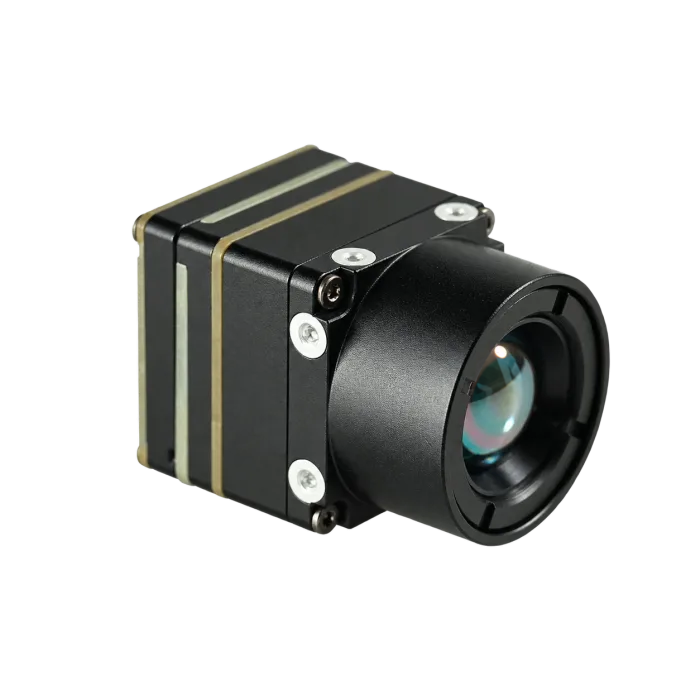
| Model / selected kit | AeroMini 640 · non-radiometric · 9 mm · USB + CVBS + MIPI |
|---|---|
| Detector type | Vanadium oxide uncooled infrared focal plane detector |
| Resolution | 640 × 512 |
| Pixel pitch | 12 μm |
| Factory frame rate | 60 Hz default / 30 Hz factory option; confirm the delivered setting |
| Spectral range | 8–14 μm |
| NETD | ≤30 mK at 25°C, F/1.0 |
| Illustrated power inputs | POWER_IN1 and POWER_IN2: 5 V only; do not connect these pins to 12 V |
| Typical module power | <0.5 W at 25°C; complete-kit and aircraft-payload consumption may differ |
| Digital video | Selected USB + CVBS + MIPI kit; confirm host, firmware, output mode and delivered frame rate |
| Control reference | 16-pin: RS232_RX / RS232_TX labels; separate 26-pin: 3.3 V UART. Use the matched board guide |
| Analog video | CVBS, PAL/NTSC on the selected board; confirm delivered output and recorder compatibility |
| Reference dimensions | 21 × 21 × 28 mm, excluding lens and flange; request ordered 9 mm assembly CAD |
| Reference weight | <20 g, excluding lens and flange; this does not prove a below-15 g acceptance target |
| Operating temperature | −40°C to +80°C; finished-payload conditions still require validation |
| Humidity | 5%–95%, non-condensing |
| Vibration | Define the aircraft environment and request matched-assembly test evidence before acceptance |
| Shock | Define handling and flight shock requirements; verify the ordered assembly against the acceptance plan |
A below-15 g target can remain a hard acceptance requirement, but the memo must define whether it means a bare core or the ordered lens-and-board assembly. AeroMini’s published <20 g reference excludes lens and flange and does not prove that target. Request the actual mass and dimensions of the matched 9 mm assembly; do not approve it against a strict limit until measured. Add cables, enclosure, mounting hardware, vibration isolation and any companion computer for the aircraft payload budget. Likewise, the <0.5 W figure is typical module consumption at 25°C, not a complete-kit power guarantee. Useful 640 × 512 target detail still depends on lens/FOV, distance, motion and viewing angle.
For a separate low-mass comparison, CAMCUDA’s current Featured SuperMini 640 imaging model (CC-SM640-I50) uses a 640 × 512, 8 μm detector at 50 Hz. It is distinct from the 30 Hz 640T thermographic model. Its published 13 × 13 × 13.4 mm dimensions and <3.5 g weight apply to the bare core, excluding optics and boards; typical core power is ≤0.5 W at 25°C, excluding the expansion board. These figures cannot prove full-kit compliance with a below-15 g limit or make it an automatic USB-kit substitute. Use the drawing below for this separate SuperMini bare-core comparison, then request a matched assembly drawing and mass. The thermal imaging cores and thermal modules categories can help compare integration scope.

The interface path must match the evidence path
Interface selection is where a uav thermal camera demo can quietly split into two different products. The prototype may stream USB video to an engineering host. The field operator may expect a low-latency ground display. A recorder may need the thermal feed plus asset context. A legacy payload may still depend on analog transmission. If those paths are not written down, the sample reorder can lock the wrong assumption.
USB-IF maintains the public USB specifications and document hub, which is useful terminology background, not proof that a specific board works with a host. In an RFQ, name the host board, connector route, cable length, capture software, power source and control requirements. Confirm supported formats, output combinations and delivered rates for the selected AeroMini firmware.
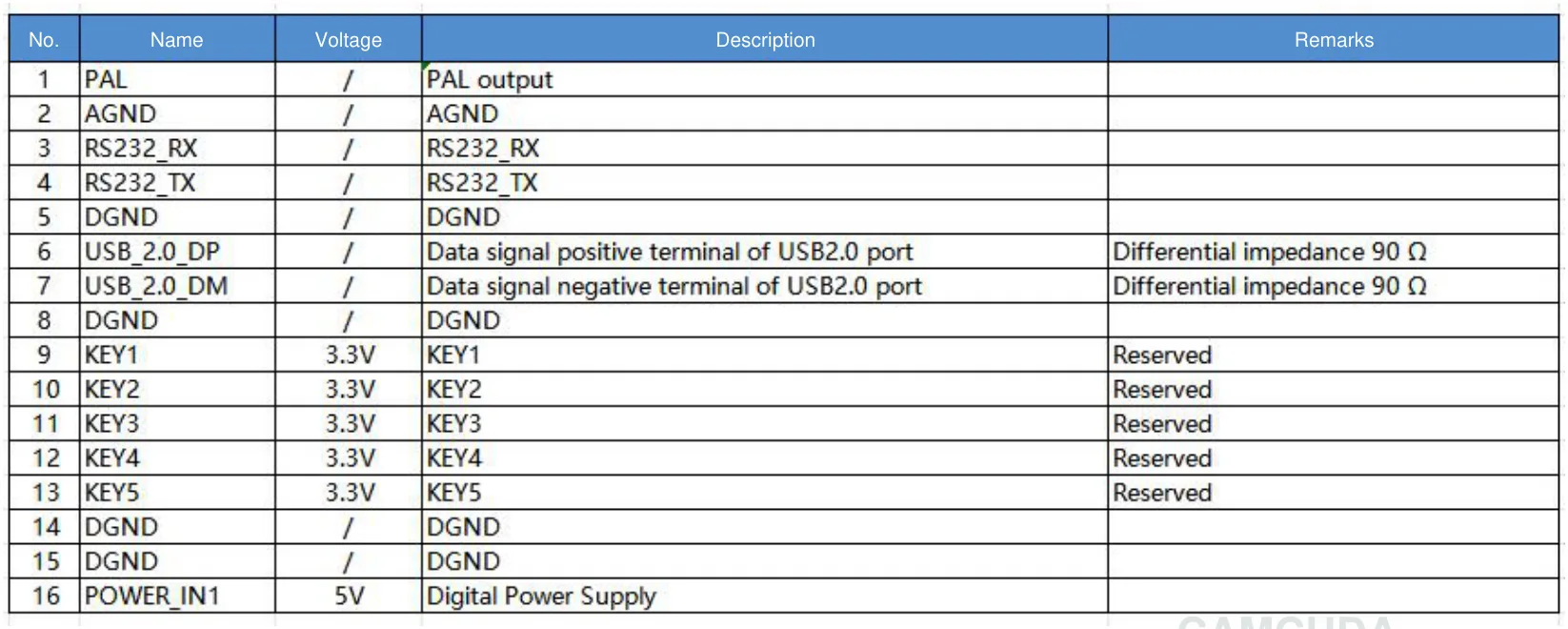
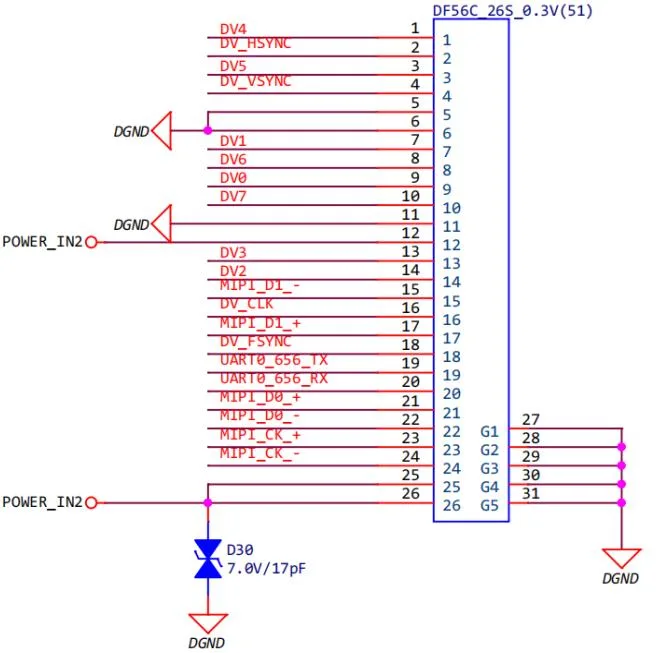
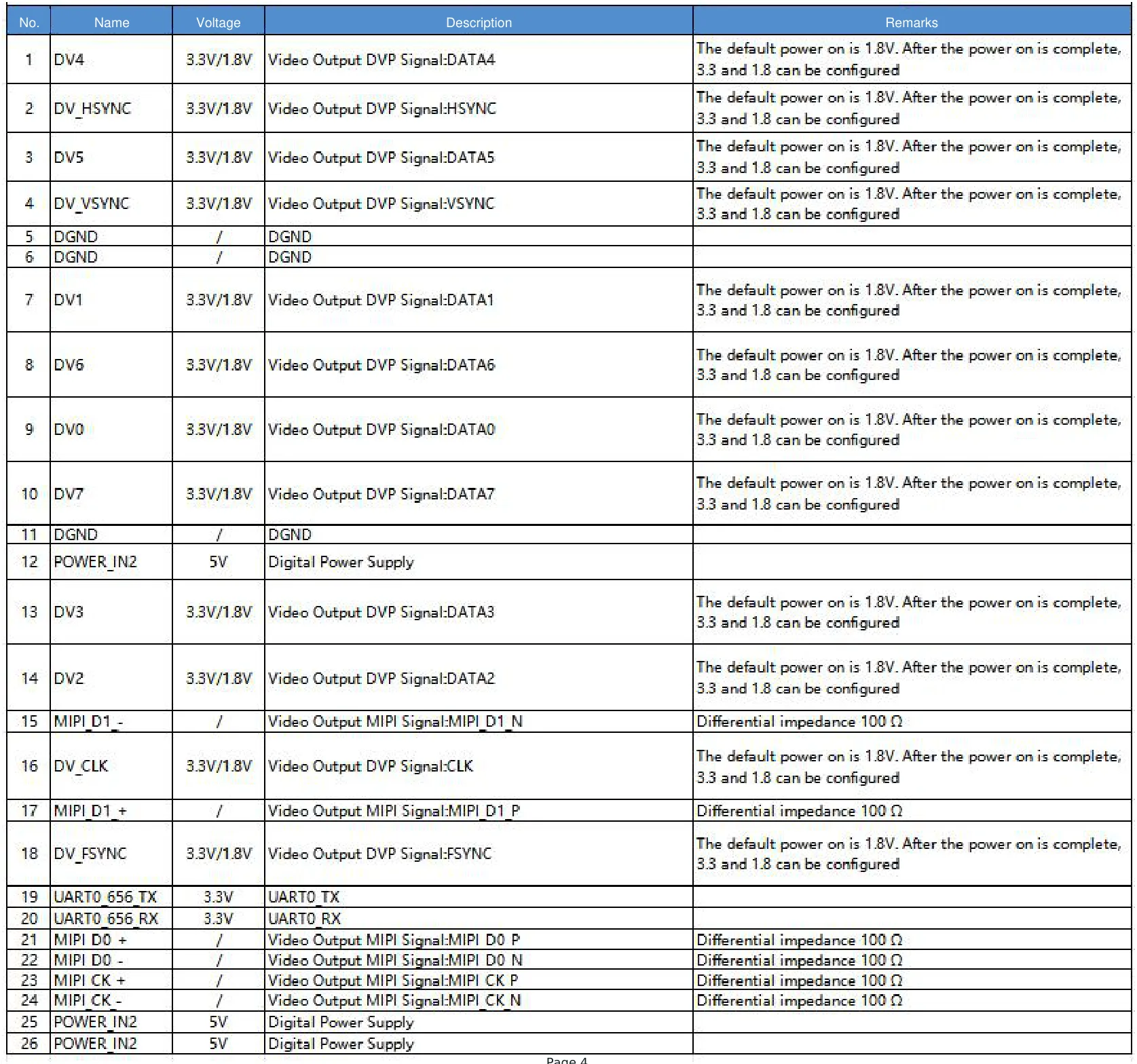
For the selected AeroMini USB + CVBS + MIPI board, use the datasheet’s 16-pin USB/CVBS reference (PDF page 3) with its matched signal table. The illustrated 16-pin controls are labelled RS232_RX and RS232_TX. The separate 26-pin MIPI/DVP schematic, 26-pin signal table and PDF page 4 identify 3.3 V UART controls. Both POWER_IN1 and POWER_IN2 are 5 V inputs: do not connect either to 12 V. Match board revision, signal levels and connector orientation before wiring; these electrical schematics are not physical mating views and do not apply to Type-C tailboards or SuperMini. Confirm the video and control paths actually used by the demo, including any CVBS recorder.
For North America procurement or utility inspection programs, ask which documents are available for the exact model, lens, board and firmware. Request the specification, matched mechanical and interface references, and any applicable CE/RoHS-related evidence. If the purchaser’s contract calls for NDAA-related documentation, request available exact-model statements and supporting records for the purchaser’s contract review. A request does not establish document availability, certification or procurement eligibility.

Illustrative example: a utility-yard demo that should not be approved on one frame
In this illustrative utility-yard scenario, not a reported customer test, a UAV integrator plans a compact thermal payload for a yard and adjacent roof line. The aircraft has a limited 5 V accessory rail. For this example, the core-only acceptance target is below 15 g, excluding the lens, tailboard, cables, enclosure and mount; the complete payload has a separate aircraft mass budget. The final enclosure, bracket and cable routing are not frozen. The operator plans one tablet for live view, and procurement is considering samples for three more pilot units. AeroMini’s <20 g reference does not demonstrate compliance with that core-only target. Require a measurement of the exact core against the 15 g limit and a separate measurement of the ordered assembly against the complete payload budget before acceptance.
Suppose the demo produces a clear thermal frame. That is encouraging, but it is not enough. The acceptance memo should say whether the contrasting area was tied to an asset ID, whether the same target was captured from a comparison angle, what altitude and distance were used, where the file was saved, whether the recorded image includes enough context for a technician, and which interface path was actually tested. Imaging contrast alone is not a measured temperature or a completed maintenance diagnosis.
FAA small UAS guidance in AC 107-2A, which supersedes AC 107-2, addresses preflight assessment of the operating environment, informing participants of their roles and responsibilities, and checking aircraft control links. Those operational checks do not define thermal payload performance or validate the recorded inspection evidence. Record the aircraft checks and the evidence checks separately in the acceptance memo.
Micron’s smart sight manufacturing article offers a broader example of vision within a quality workflow. It does not validate this illustrative UAV scenario or CAMCUDA hardware. The useful lesson for a buyer is to preserve the chain from flight to saved evidence to ground follow-up in the acceptance memo.
Common mistakes after a UAV thermal camera demo
- Approving the best frame instead of the evidence method. A dramatic palette can be persuasive while missing asset context or comparison data.
- Forgetting the prototype shortcuts. A temporary host, loose cable, or bench power supply may not represent the final aircraft.
- Asking for every interface. USB, CVBS and MIPI requirements should follow the real host, display and recorder architecture; match control signals to the supplied board.
- Leaving documentation until purchasing. Identify the drawings, interface references and any NDAA-related records the purchaser needs, then confirm what is available for the exact configuration.
- Ignoring the field-service handoff. If nobody can find the asset after landing, the thermal image does not become maintenance evidence.
RFQ acceptance memo for a safer sample reorder
Send this one-page memo with the RFQ or sample reorder request. It gives CAMCUDA engineering and the buyer’s procurement team the same reference point.
| Mission | UAV platform, asset type, inspection decision, and who uses the thermal result |
|---|---|
| Demo evidence | Representative image/video, asset ID, distance/altitude, time, weather, operating condition, and comparison view |
| Payload constraints | Defined bare-core or ordered-assembly mass limit, measured matched-assembly mass, power rail, lens/FOV, enclosure, mount, cable bend and vibration expectation |
| Interface path | Selected USB/CVBS/MIPI board and revision, host/firmware, factory frame rate, matched control signals, recorder and operator display |
| Evidence workflow | File naming, location reference, operator note, post-flight review owner, and ground verification trigger |
| Documents | Exact-model specs, ordered-assembly drawing, matched electrical references and available CE/RoHS or NDAA-related records needed for purchaser contract review |
| Commercial context | Sample quantity, destination market, expected pilot schedule, and configuration that must not change without approval |
Use CAMCUDA’s support downloads and support FAQ to prepare the memo. For this configuration, use the AeroMini datasheet, AeroMini Linux/SDK FAQ and its linked AeroMini developer-resource folder to identify the matching manual, serial commands and host resources. Match board, firmware, format and rate; a resource listing does not establish software compatibility. Request the ordered 9 mm assembly CAD because the listed STEP reference is for 7 mm. For the separate SuperMini comparison, use its own V1.0.0 manual. When the acceptance notes are ready, send them through the contact and RFQ page with the exact model and unresolved test items.
UAV thermal camera FAQ
What should a uav thermal camera demo prove?
It should prove more than live video. A useful demo shows that the target can be seen under realistic conditions, the payload fits the aircraft limits, the interface path works, the evidence can be saved with context, and the documents needed for purchase can be requested.
Is a good thermal image enough for sample approval?
No. A good image is only part of acceptance. The buyer should also record target size, distance, field of view, operating conditions, file path, asset context, and follow-up action.
Why is AeroMini 640 relevant to UAV payload teams?
AeroMini 640 offers a defined 640 × 512 non-radiometric evaluation configuration with a 9 mm lens and USB + CVBS + MIPI kit, at 60 Hz factory default or an ordered 30 Hz factory option. It is imaging-only. Its <20 g reference excludes lens and flange, and its <0.5 W typical module power at 25°C is not a kit guarantee. Confirm matched-assembly mass, CAD, host, wiring and acceptance limits before reorder.
When should the RFQ mention CVBS?
Mention CVBS when the UAV or ground station uses analog video transmission, a legacy display, a recorder, or a retrofit payload chain. For the selected AeroMini USB + CVBS + MIPI kit, confirm the actual delivered output, PAL/NTSC format and recorder compatibility. Use the matched board guide; a Type-C tailboard or a SuperMini core needs its own interface review.
Does USB video define the whole payload architecture?
No. USB video is one path. The host board, connector, cable route, capture software, power source, control interface, recording destination, and operator display still need to be defined.
What documents should North America procurement request?
Ask which product specifications, matched assembly drawings, electrical references and applicable compliance records are available for the exact configuration. If the program needs NDAA-related documents, request available exact-model statements and supporting records for the purchaser’s contract review. Do not infer certification, eligibility or document availability from the request.
How can buyers avoid changing the sample after approval?
Write the approved configuration in the memo: module, lens/FOV assumption, video path, control path, mount/enclosure assumptions, documentation needs, and any output that must be confirmed. If a later change is necessary, treat it as a configuration change, not a silent substitution.
What should be sent to CAMCUDA before a sample reorder?
Send the mission, representative demo evidence, target geometry, a defined mass limit, measured ordered-assembly mass, power and interface constraints, requested documents, destination market and sample quantity. Identify the AeroMini 640 non-radiometric 9 mm USB + CVBS + MIPI configuration and requested factory frame rate. If comparing SuperMini 640 imaging/50 Hz, list it separately and request its matched lens-and-board assembly details.
Turn the demo into an RFQ CAMCUDA can evaluate
If your team is evaluating a uav thermal camera sample, review the AeroMini 640 product page, the drone application guidance, and the matching documentation above. Then send CAMCUDA the acceptance memo: target, distance, lens/FOV, strict payload limits, delivered configuration, video path, evidence workflow and documents required for purchaser review. Reorder when the accepted configuration and remaining conditions are explicit, not merely because the best demo frame looked convincing.
Technical author: Daniel · Hardware Support
Sales contributors: Vivian, Lena and Sophie